When your Shark Ion Flex vacuum's brush roll indicator light is not on, it can be frustrating. You rely on this light to confirm that the brush roll is working correctly and that your vacuum is cleaning as it should. When the indicator stays off, your vacuum may not be picking up dirt, hair, or debris as efficiently, and you might worry that something is wrong with your device. This problem is more common than many people think, and it can happen for several reasons, from simple user errors to more serious technical faults.
Understanding why the brush roll indicator light is off, and how to fix it, is not just about convenience. It's about keeping your vacuum working well, protecting your investment, and making sure your floors are as clean as possible. This guide will walk you through everything you need to know—from quick checks and easy fixes to more advanced troubleshooting and maintenance tips.
If you have a Shark Ion Flex and are facing this issue, or if you want to be ready for it, you will find every detail here.
What Does The Brush Roll Indicator Light Do?
The brush roll indicator light on your Shark Ion Flex is a small LED, usually located near the power button or the brush roll area. Its main job is to tell you if the brush roll (the spinning brush at the bottom of your vacuum) is working properly. When everything is fine, the light is solid green. If there’s a problem, the light can turn red, flash, or—in the case we’re discussing—not turn on at all.
This light is important for several reasons:
- It shows that the brush roll is spinning, which is needed for deep cleaning carpets and picking up hair.
- It warns you about jams, blockages, or motor issues.
- It helps you quickly spot problems before they get worse.
Without this light, you may not know if your vacuum is cleaning as it should.
Common Reasons The Brush Roll Indicator Light Is Not On
There are several possible reasons why the brush roll indicator light on your Shark Ion Flex is not on. Some are simple and easy to fix, while others may need more detailed troubleshooting.
1. The Vacuum Is Not Fully Assembled
The Shark Ion Flex vacuum is designed with safety features. If all parts are not connected correctly—especially the handheld part, wand, and floor nozzle—the brush roll may not start, and the light will stay off.
What to check: Make sure every part clicks into place. Even a slightly loose connection can cause the light to stay off.
2. The Vacuum Is Not Powered On
This sounds basic, but sometimes the vacuum is not switched to the right mode, or the battery is dead.
What to check: Make sure the battery is charged and the vacuum is turned on. Try switching between different power modes.
3. The Floor Nozzle Is Not Attached Properly
The brush roll is in the floor nozzle. If the nozzle is not attached tightly to the wand or handheld unit, the vacuum will stop sending power to the brush roll, and the light will remain off.
What to check: Remove and reattach the floor nozzle. Listen for a click and gently tug to confirm it’s secure.
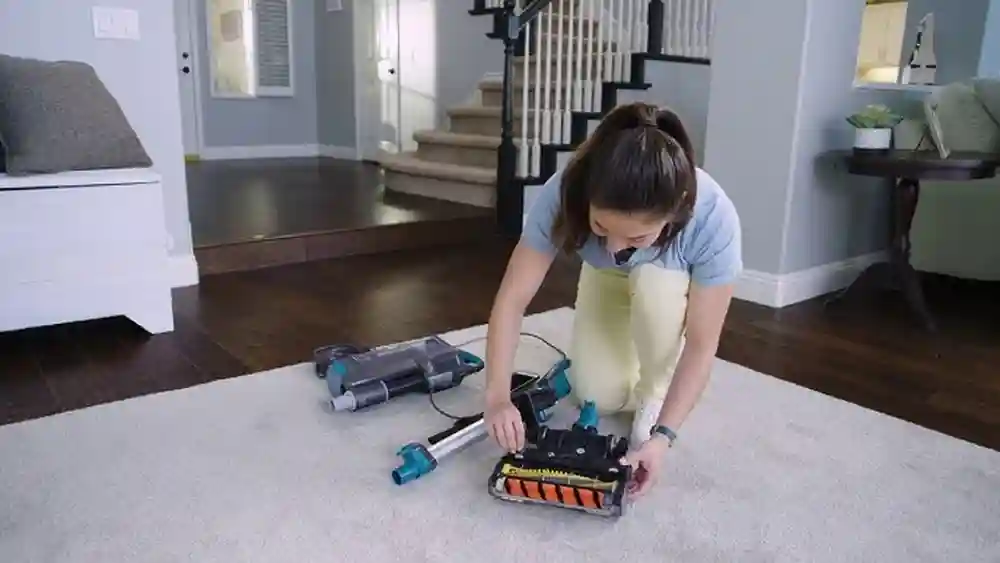
4. The Brush Roll Is Blocked Or Jammed
Hair, string, or large debris can wrap around the brush roll, stopping it from spinning. The vacuum detects this and turns off the brush roll and its indicator light.
What to check: Turn off the vacuum, remove the nozzle, and look for blockages. Remove any tangled hair or debris.
5. The Vacuum Is In Handheld Mode
On some Shark Ion Flex models, the brush roll only works when the vacuum is used as a stick (upright) vacuum, not as a handheld. The light will not come on in handheld mode.
What to check: Make sure you are using the vacuum in the correct mode for brush roll operation.
6. The Brush Roll Motor Has Failed
If the motor that spins the brush roll fails, the light will not come on. This is a more serious issue and may require professional repair.
What to check: Listen for any unusual noises or a complete lack of movement from the brush roll.
7. The Led Light Or Its Circuit Is Faulty
Sometimes, the problem is not with the brush roll itself but with the small circuit that powers the indicator light.
What to check: If the vacuum works and the brush roll spins, but the light is off, the LED may be faulty.
8. The Battery Is Low Or Not Seated Correctly
A weak or improperly seated battery can cause power issues, affecting the brush roll and the indicator light.
What to check: Remove the battery, reinsert it, and make sure it is fully charged.
9. The Filters Are Clogged
Some Shark Ion Flex models have a safety shut-off if the airflow is blocked by dirty filters. This can affect the brush roll and turn off the light.
What to check: Clean or replace the filters as described in your manual.
10. Internal Wiring Issues
Damage to internal wires or connectors can prevent power from reaching the brush roll and its indicator light.
What to check: This is harder to check at home. If you suspect this, contact Shark customer support.
How To Troubleshoot The Problem
When the brush roll indicator light is not on, start with the simplest solutions and move to more complex ones. Here’s a clear step-by-step guide:
Step 1: Check Power And Battery
- Make sure the vacuum is charged.
- Remove and reinsert the battery. Listen for a click.
- Try a different outlet or charger if possible.
Step 2: Inspect All Connections
- Detach and reattach the handheld unit, wand, and floor nozzle.
- Ensure each part is fully connected.
Step 3: Test The Modes
- Use the vacuum as a stick vacuum (not handheld).
- Switch between carpet and hard floor settings.
Step 4: Look For Blockages
- Turn off the vacuum.
- Remove the floor nozzle and inspect the brush roll.
- Clear away any hair, string, or objects.
Step 5: Clean The Filters
- Remove and wash or replace filters.
- Let filters dry completely before reinserting.
Step 6: Reset The Vacuum
- Some models have a reset button near the brush roll.
- Press and hold for 10 seconds.
- If there’s no button, unplug or remove the battery for a minute, then reconnect.
Step 7: Examine The Brush Roll
- Make sure the brush roll spins freely by hand.
- If it’s hard to turn, clean the bearings.
Step 8: Check For Broken Parts
- Look for cracks, missing pieces, or burnt smells.
- If you see damage, stop using the vacuum and contact support.
Step 9: Test The Indicator Light
- If the vacuum cleans but the indicator is still off, the LED may be faulty.
- Compare with another Shark Ion Flex if possible.
Step 10: Contact Shark Support
- If none of these steps work, reach out to Shark’s customer service for repair or replacement advice.
Real-world Example: Troubleshooting Case Study
Consider this scenario: Maria noticed her Shark Ion Flex brush roll indicator was not lighting up. She checked the battery, which was charged. She switched modes, cleaned the filters, and reattached all parts, but the light stayed off. Finally, she found a small hairband wrapped around the brush roll. Once removed, the indicator light turned green again.
This example shows that sometimes, even a small item can cause the indicator to stay off. Always check for blockages, and do not ignore small signs.
Comparing Shark Ion Flex Models
Different Shark Ion Flex models have slight differences in how their brush roll indicator lights work. Here’s a comparison to help you understand what to expect:
| Model | Indicator Light Location | Brush Roll Mode | Common Issues |
|---|---|---|---|
| Ion Flex IF201 | Near power button | Only in stick mode | Loose nozzle, battery issues |
| Ion Flex DuoClean IF251 | On floor nozzle | Stick and some handheld modes | Blockages, filter clogs |
| Ion Flex IF200 | Near brush roll | Stick mode only | Wiring faults, jammed brush |
Knowing your model can help you troubleshoot faster.
How The Brush Roll System Works
To understand why the indicator light might not be on, it helps to know how the system works. The Shark Ion Flex uses a motor to spin the brush roll. Sensors check if the roll spins and if all parts are connected. The light comes on when everything works as expected.
If the sensors detect a problem (like a jam or missing part), they cut power to the brush roll and turn off the indicator. This protects the motor and prevents damage.
Here’s a simplified view of the system:
| Component | Role | Problem if Faulty |
|---|---|---|
| Brush roll | Picks up dirt and hair | Stops spinning, light off |
| Sensor | Checks brush roll movement | Wrong light, false alerts |
| LED light | Shows brush roll status | No indicator, even if working |
| Connection pins | Send power to nozzle | Brush roll and light off |
If one part fails, the indicator may not come on.
Maintenance Tips To Prevent Future Problems
Keeping your Shark Ion Flex in good shape helps avoid brush roll indicator light issues. Here are useful tips:
- Clean the brush roll weekly. Remove hair, string, and debris to prevent jams.
- Wash filters every month. Dirty filters stress the motor and can trigger safety shut-offs.
- Check all connections after every use. Make sure no parts are loose.
- Inspect the nozzle pins for dust or corrosion. Wipe with a dry cloth.
- Charge the battery fully before use. Replace old batteries as needed.
- Store the vacuum in a dry place. Moisture can damage circuits and motors.
- Use only Shark parts for replacements. Generic parts may not fit well and cause problems.
- Check for firmware updates. Some advanced models can be updated for better performance.
Regular care makes indicator light issues rare and extends your vacuum’s life.
When To Seek Professional Help
Sometimes, home troubleshooting cannot fix the problem. If you notice any of these signs, contact Shark customer service or a certified repair shop:
- Burning smells or smoke from the vacuum
- Visible broken wires or parts
- The brush roll will not move, even after cleaning and resetting
- The indicator light never comes on, but the vacuum works otherwise
Do not open the vacuum’s motor or internal wiring unless you are trained. You might void the warranty or cause further damage.
How To Contact Shark Support
Shark offers several ways to get help:
- Phone: Call the support number in your manual or on the Shark website.
- Live chat: Available on the Shark website for quick answers.
- Email: Send details and photos for more complex problems.
- Authorized service centers: For repairs still under warranty.
Have your vacuum’s model number and purchase details ready when you contact support.
Warranty And Repair Options
Shark Ion Flex vacuums usually come with a limited warranty. This covers defects in materials and workmanship, but not normal wear or misuse. If your brush roll indicator light stops working due to a fault, you may be eligible for a free repair or replacement within the warranty period.
If your vacuum is out of warranty, you can still get repairs, but you may have to pay for parts and labor. Always use authorized service centers to avoid further issues.
Avoiding Common Mistakes
Many users make simple mistakes that lead to the brush roll indicator light not working. Here’s how to avoid them:
- Don’t use the vacuum on wet floors. Moisture can cause electrical problems.
- Don’t pull on the cord or battery. This can loosen connections.
- Don’t ignore small jams. They can grow and cause bigger problems.
- Don’t use the wrong battery charger. Only use Shark-approved chargers.
- Don’t store the vacuum near heat sources. Heat can damage plastic and electronics.
Careful use reduces the risk of indicator light issues.
Advanced Troubleshooting Steps
If basic fixes do not solve the problem, you may need to try more advanced steps. Only attempt these if you are comfortable working with small parts.
1. Inspect The Brush Roll Motor
Remove the floor nozzle (with the vacuum off and battery out). Locate the brush roll motor. Check for:
- Burnt smells
- Loose wires
- Broken gears
If you find damage, the motor may need to be replaced.
2. Test The Indicator Led
If you have a multimeter, you can test the LED circuit. If the LED does not get power, the circuit board may be faulty.
3. Examine Connection Pins
Use a flashlight to check the pins where the nozzle meets the wand or handheld unit. If they are bent or dirty, clean or gently straighten them.
4. Replace The Brush Roll
If the brush roll is worn out or damaged, it may not trigger the sensor. Replace with a genuine Shark part.
5. Update Firmware (if Available)
Some smart Shark models allow firmware updates. Check the manual or Shark’s website for instructions.
If these steps sound too technical, it’s safer to call a professional.
Understanding The Shark Ion Flex Battery System
Many brush roll indicator light issues are due to battery problems. The Shark Ion Flex uses a removable lithium-ion battery. Over time, batteries lose capacity and may not provide enough power for the brush roll.
Signs of battery trouble:
- Short run time
- Vacuum shuts off suddenly
- Indicator lights flicker or stay off
Tips:
- Replace old batteries every 2-3 years.
- Store batteries in a cool, dry place.
- Do not leave the battery on the charger for days.
Shark Ion Flex Vs. Other Shark Models
How does the Ion Flex compare with other Shark vacuums when it comes to the brush roll indicator light?
| Model | Brush Roll Light | Common Light Issues | Fix Difficulty |
|---|---|---|---|
| Ion Flex | Yes | Blockages, loose parts | Medium |
| Ninja Rocket | No | None (no light) | Easy |
| Lift-Away | Yes | Filter clogs, battery | Medium |
| Navigator | No | None (no light) | Easy |
The Ion Flex’s indicator light is a helpful feature, but also adds another part that can fail. Other models without this light may be simpler but give less feedback.
Non-obvious Insights For Shark Ion Flex Owners
Here are two insights most new users miss:
- The brush roll indicator light does NOT work in handheld mode for most Ion Flex models. If you remove the wand or nozzle, the light will stay off by design—even if the vacuum runs.
- A dirty or misaligned sensor can turn off the indicator light even if the brush roll and motor are fine. Use a soft brush to clean the area around the brush roll sensor (usually a small plastic window near the roll).
These details can save you hours of confusion.
The Role Of Sensors In Indicator Light Function
Modern vacuums like the Shark Ion Flex use sensors to check if the brush roll is working. These sensors can become blocked by dust or hair, causing the indicator light to stay off.
How to clean the sensor:
- Turn off and unplug the vacuum.
- Find the sensor near the brush roll (check your manual).
- Use a dry brush or compressed air to remove dust.
A clean sensor means a more reliable indicator light.
How To Test If The Brush Roll Is Spinning
If you are unsure whether the brush roll is actually working, do this simple test:
- Turn on the vacuum in stick mode.
- Place the vacuum on a carpet.
- Carefully tilt the vacuum and look at the brush roll. Is it spinning?
- If not, there may be a deeper issue.
Never put your fingers near the brush roll while the vacuum is on.
Why Regular Cleaning Helps
Regular cleaning is the best way to prevent brush roll indicator light problems. Dust, hair, and debris can quickly build up and cause jams or sensor errors. A clean vacuum works better, lasts longer, and saves you from costly repairs.
Set a monthly reminder to clean your vacuum thoroughly, including the brush roll, filters, and sensors.
Credit: www.walmart.com
Upgrading Or Replacing Your Shark Ion Flex
If your vacuum is old and has repeated indicator light problems, it may be time to upgrade. Newer Shark models have improved sensors, longer battery life, and easier-to-clean brush rolls.
When choosing a new vacuum:
- Look for models with easy brush roll access.
- Consider battery life and charging time.
- Check for new features like LED headlights or Wi-Fi updates.
For more details on Shark’s latest models, visit the official Shark website.
Environmental Impact Of Vacuum Maintenance
Taking care of your Shark Ion Flex means fewer parts end up in landfills. Replacing only the brush roll or battery, instead of the whole vacuum, is better for the environment and your wallet. Always recycle old batteries at a certified recycling center.
Cost Of Repair Vs. Replacement
When the brush roll indicator light fails, you may wonder if it’s worth fixing or if you should buy a new vacuum. Here’s a simple breakdown:
- LED or sensor replacement: $10–$30 (parts only)
- Brush roll motor replacement: $30–$60 (parts only)
- Professional labor: $40–$100 per hour
- New Shark Ion Flex vacuum: $200–$350
If your vacuum is more than 4–5 years old, or has multiple issues, replacement might make more sense.
What To Expect From Professional Repair
If you take your Shark Ion Flex to a service center, they will:
- Inspect the vacuum and diagnose the problem.
- Give you an estimate before starting repairs.
- Replace faulty parts with genuine Shark components.
- Test the vacuum before returning it.
Always ask for a warranty on the repair work.
Credit: support.sharkninja.ca
User Stories: What Others Have Experienced
Hearing from other users can help. For example:
- John had his brush roll indicator light stop working after vacuuming up a lot of pet hair. Cleaning the brush roll and filter fixed the issue.
- Priya found that the indicator light was off because the nozzle was not snapped in fully. Reattaching it solved the problem.
- Carlos needed a new battery. After replacing it, his vacuum and indicator light worked as new.
Most problems have simple solutions.
Frequently Asked Questions
What Does It Mean If My Shark Ion Flex Brush Roll Indicator Light Is Off But The Vacuum Still Works?
If the vacuum runs but the brush roll indicator light is off, the LED or its circuit may be faulty, or the sensor may be dirty. The brush roll might not be spinning, so check for jams and clean all sensors.
Can I Use My Vacuum If The Brush Roll Indicator Light Is Not Working?
You can use the vacuum, but it may not clean carpets well if the brush roll is not spinning. It’s best to fix the problem to ensure deep cleaning.
How Do I Reset The Shark Ion Flex Vacuum?
To reset, turn off the vacuum and remove the battery. Wait one minute, then reinsert the battery and turn it back on. Some models have a reset button near the brush roll.
How Often Should I Clean The Brush Roll And Filters?
Clean the brush roll weekly and the filters monthly. More frequent cleaning is needed if you have pets or vacuum high-traffic areas.

Credit: www.youtube.com
Where Can I Find Replacement Parts For My Shark Ion Flex?
Buy replacement parts directly from the Shark official website or from authorized retailers. This ensures parts fit correctly and work with your model.
Maintaining your Shark Ion Flex and understanding how the brush roll indicator light works will keep your vacuum cleaning at its best. Regular checks and cleaning prevent most problems, and you’ll be ready if the light ever goes off again.