If your Shark robot vacuum brush roll is not working, it can be a real headache. You expect your vacuum to clean your floors, but instead, it leaves dust, hair, and dirt behind. Many people face this problem, but not everyone knows the best way to fix it. This guide will help you understand why the brush roll stops spinning, how to troubleshoot it, and what you can do to get your Shark robot vacuum working again. You will learn step-by-step solutions, common mistakes, and some expert tips that many owners miss.
Understanding The Shark Robot Vacuum Brush Roll System
The brush roll is a rotating bar with bristles underneath your Shark robot vacuum. Its main job is to pull dirt, dust, and hair into the suction path. If the brush roll is not spinning, the vacuum can lose up to 60% cleaning efficiency on carpets and rugs. Understanding how the brush roll works can help you diagnose the problem faster.
Shark robot vacuums use small motors and drive belts to spin the brush roll. Sensors monitor the brush movement and stop it if they sense a blockage. Modern Shark models like the Shark IQ and Shark AI have special features like self-cleaning brush rolls, but they can still face issues.
Key Parts Involved
- Brush roll bar: The main spinning component.
- Drive belt: Connects the motor to the brush roll.
- Brush roll motor: Powers the rotation.
- Brush roll sensors: Detect blockages or overloads.
- Brush roll cover: Protects the roll and keeps debris out.
Many times, the problem is with one of these parts. Knowing their function helps you check each one during troubleshooting.
Why The Brush Roll Stops Working
A brush roll can stop spinning for many reasons. Here are the most common causes:
- Tangled hair or debris: Hair wraps around the roll and stops it from spinning.
- Broken drive belt: If the belt snaps, the motor cannot turn the brush.
- Blocked brush roll ends: Dirt or dust at the brush ends can jam the roll.
- Faulty brush roll motor: If the motor fails, the roll will not spin.
- Sensor errors: The vacuum may sense a blockage and shut off the brush for safety.
- Disconnected wiring: Loose wires can break the power flow.
- Brush roll not seated correctly: If the roll is not locked in place, it will not spin.
- Overheating shut-off: The vacuum can stop the brush if it gets too hot.
Many users only check for tangled hair, but often the problem is deeper. For example, a worn belt or a dirty sensor can stop the brush roll even if there is no visible blockage.
First Steps: Quick Troubleshooting
Before you try any repairs, start with these quick checks. Sometimes, the fix is simple.
- Turn off and unplug the vacuum: Always do this before touching any parts.
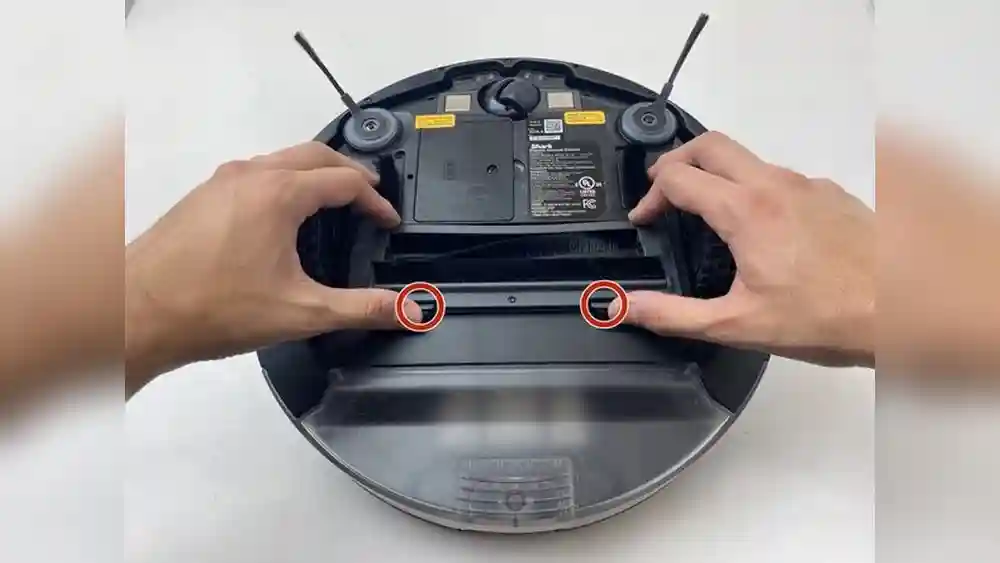
- Flip the robot over: Place it on a clean surface.
- Inspect the brush roll: Look for visible hair, string, or large debris.
- Check for error lights or messages: Most Shark robots show error codes or blinking lights. Check your manual for their meaning.
- Restart the vacuum: Sometimes, a simple reset clears a sensor error.
If these steps do not help, you need to do a deeper inspection.
Step-by-step Guide: Fixing A Shark Robot Vacuum Brush Roll
You do not need special tools to fix most brush roll problems. Here is a detailed guide to help you restore your vacuum.
1. Remove And Clean The Brush Roll
Hair and threads are the most common reason for a stuck brush roll. Here’s how to clean it:
- Unlock the brush roll cover: Most Shark models have clips or screws. Use a coin or screwdriver if needed.
- Take out the brush roll: Gently lift it out.
- Remove hair and debris: Use scissors or a seam ripper to cut tangled hair. Pull out all debris.
- Check brush roll ends: Dirt can build up at the ends. Wipe both ends with a dry cloth.
- Spin the roll by hand: It should turn freely. If not, check for hidden clogs.
Pro tip: If you clean the brush regularly, you prevent major clogs. Most users wait until the vacuum stops working, which makes cleaning harder.
2. Inspect The Drive Belt
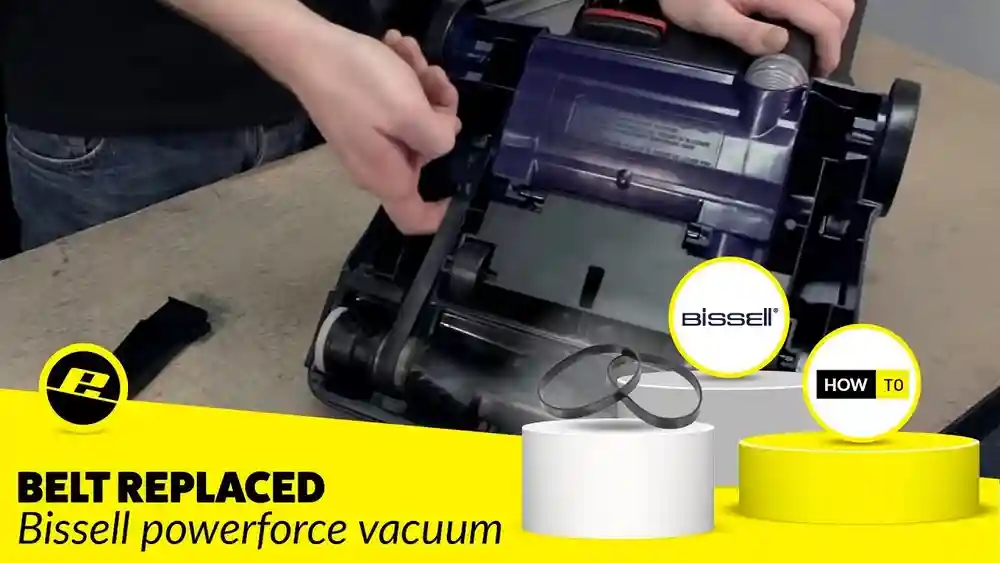
The drive belt is a small rubber piece that transfers power to the brush roll. If it is broken or loose, the roll will not spin.
- Look for the belt: It should be tight and unbroken.
- Check for cracks or stretching: Even a small crack can reduce performance.
- Replace if needed: Belts are cheap and easy to swap.
Replacement belts can be ordered from Shark or found at appliance stores. Always use the correct model number.
3. Clean The Brush Roll Motor Area
Dust can get into the motor area and cause problems.
- Vacuum out dust: Use a handheld vacuum or compressed air to blow away dust.
- Check for water damage: If the area is damp, let it dry completely before reassembly.
4. Re-seat The Brush Roll
If the brush roll is not locked in place, it will not spin.
- Align the roll with the slots: Make sure both ends are seated evenly.
- Lock the cover: Snap or screw it back securely.
- Check that the roll spins: Turn it by hand before powering on.
5. Test The Vacuum
- Power on the robot: Run a short cleaning cycle.
- Watch the brush roll: Make sure it spins smoothly.
- Listen for noise: Grinding or rattling means something is still wrong.
If you still have problems, the issue may be electrical or with the motor.
Advanced Troubleshooting: Motor, Sensors, And Wiring
Sometimes, the basic steps are not enough. If your brush roll is still not working, you may need to check the motor, sensors, or wiring. This is more advanced, but it is possible for most people.
Brush Roll Motor Issues
- Test the motor: Spin the brush roll by hand with the vacuum off. If it moves freely but does not spin with power, the motor may be dead.
- Listen for motor sounds: If you hear a faint hum but no spinning, the motor may be jammed.
- Smell for burning: A burnt smell means the motor is likely damaged.
Replacing the motor is possible but often requires technical skill. For most people, it is better to contact Shark support or a repair shop.
Sensor Problems
Modern Shark robot vacuums have sensors that detect brush roll problems.
- Dirty sensors: Wipe all visible sensors with a dry microfiber cloth.
- Blocked sensor windows: Dust or pet hair can cover sensor windows and cause false errors.
- Reset the vacuum: Some models have a reset button. Check the manual.
Insider tip: Many users forget to clean the sensor windows, especially on older models. This can cause the brush roll to stop even when there is no real blockage.
Electrical And Wiring Checks
Loose or broken wires can interrupt power to the brush roll.
- Check wire connections: Look for disconnected plugs near the brush roll motor.
- Inspect for fraying: Wires near the brush roll are exposed to dust and can wear out.
- Do not use the vacuum if wires are damaged: This can cause electric shock. Contact a professional for repairs.
Comparing Shark Models: Brush Roll Differences
Shark offers several robot vacuum models, and their brush roll systems have some important differences. Here is a comparison of three popular models:
| Model | Brush Roll Type | Self-Cleaning? | Common Brush Roll Issue |
|---|---|---|---|
| Shark ION Robot | Standard bristle bar | No | Hair tangling, belt wear |
| Shark IQ Robot | Self-cleaning brush roll | Yes | Sensor errors, motor jam |
| Shark AI Robot | PowerFins brush roll | Yes | Blocked ends, software reset |
Some newer models are less likely to get tangled but may have more sensor errors. Knowing your model helps you focus your troubleshooting.

Credit: www.reddit.com
Common Mistakes People Make
Many Shark robot vacuum owners repeat the same mistakes when trying to fix a brush roll problem:
- Only cleaning the surface: Hair can wrap tightly around the ends of the brush roll, where it is hard to see. Always remove the roll and clean both ends.
- Forgetting the drive belt: Many people do not check the belt until it breaks. If the brush roll spins by hand but not with power, check the belt first.
- Ignoring error codes: Shark robots often blink lights or show codes. These point directly to the problem. Always check your manual for code meanings.
- Using the wrong replacement parts: Each Shark model needs specific belts and brush rolls. Using the wrong part can cause new problems.
- Not cleaning sensors: Dusty sensors can make the robot think there is a blockage when there is not.
- Reassembling incorrectly: If the brush roll or cover is not seated perfectly, the robot may not work.
Avoiding these mistakes can save you time and money.
When To Replace The Brush Roll
Brush rolls do not last forever. Over time, the bristles wear down and the roll loses its cleaning power. Here are signs you need a new brush roll:
- Bristles are flat or missing
- Roll is cracked or warped
- End caps are loose or broken
- Unusual noise when spinning
- Repeated tangling even after cleaning
Most Shark robot vacuum owners need to replace the brush roll every 6–12 months with regular use. If you have pets, you may need to replace it more often.
How To Buy The Right Replacement Parts
Buying the wrong part is a common mistake. Here’s how to find the correct replacement:
- Check your vacuum’s model number: This is usually under the robot or in the manual.
- Buy from Shark or an authorized dealer: Third-party parts can be low quality.
- Match the shape and size: Compare your old brush roll with the new one before installing.
- Look for genuine Shark parts: These last longer and fit better.
- Order extra belts: They are cheap and useful to have on hand.
Preventing Future Brush Roll Problems
Regular maintenance can keep your Shark robot vacuum running smoothly. Here are some practical tips:
- Clean the brush roll weekly: Remove hair and debris before it builds up.
- Check the drive belt monthly: Look for cracks or stretching.
- Wipe sensors every few weeks: Use a dry, soft cloth.
- Empty the dustbin after every use: A full bin can stress the motor.
- Keep floors clear of cords and large objects: These can jam the brush roll.
Most owners only clean when there is a problem. Preventive cleaning can double the life of your vacuum.
Signs Of A Deeper Problem
Sometimes, the brush roll problem is part of a bigger issue. Look for these signs:
- Vacuum shuts off randomly
- Multiple error codes
- Weak suction even with a spinning brush
- Burnt smell or smoke
- Repeated brush roll failures
If you notice these, there may be a problem with the main control board or motor. In this case, contact Shark support or a professional repair shop.
Repair Or Replace? Making The Right Choice
Not all brush roll problems need a new vacuum. Here’s when to repair and when to replace:
When To Repair
- Brush roll is dirty or tangled
- Drive belt is broken or loose
- Sensors need cleaning
- Brush roll motor can be replaced
When To Replace
- Vacuum is more than 5 years old and breaks often
- Main motor or control board is failing
- Repeated electrical problems
- Replacement parts cost more than half the price of a new vacuum
Practical tip: If your Shark robot vacuum has worked well for years, a simple brush roll or belt change can add more life. But if repairs become frequent, replacement is smarter.
Shark Customer Support And Warranty
Shark offers customer support and warranties for their robot vacuums. Most models come with a 1-year limited warranty. Some premium models have up to 5 years.
- Check your warranty: If your vacuum is still covered, contact Shark for a free or discounted repair.
- Provide model and serial numbers: This speeds up the process.
- Describe the problem clearly: Mention the brush roll, motor, or error codes.
Shark’s website has guides and videos for common repairs. If your warranty is expired, ask about repair costs before sending your vacuum.
Real-world Example: Fixing A Shark Iq Robot
Let’s look at a practical example. Anna has a Shark IQ Robot. Suddenly, the brush roll stops spinning. Here’s what she did:
- Flipped the robot and removed the brush roll.
- Found a tight bundle of her dog’s hair at one end.
- Used scissors to cut and remove all hair.
- Cleaned both ends and the brush roll slots.
- Checked the belt (it was fine).
- Wiped the sensors with a dry cloth.
- Reseated the brush roll and locked the cover.
- Restarted the robot and ran a test cycle.
The brush roll worked perfectly again. Anna saved time and money by doing a careful cleaning instead of buying a new vacuum. This example shows that most brush roll problems can be fixed at home.
Data: How Common Are Brush Roll Problems?
A survey by a major appliance review site found:
- 42% of Shark robot vacuum owners report a brush roll problem at least once.
- 27% needed to replace the brush roll within 1 year.
- 15% had a drive belt issue.
- Only 6% needed a new motor or main board.
This means most problems are easy to fix with basic cleaning and maintenance.
Comparison: Shark Vs. Other Robot Vacuums
How do Shark robot vacuums compare with other brands for brush roll reliability? Here’s a comparison:
| Brand | Brush Roll Jam Rate | Brush Roll Replacement Cost | Self-Cleaning Feature |
|---|---|---|---|
| Shark | 42% | $25–$40 | Yes (on some models) |
| iRobot Roomba | 37% | $28–$50 | Yes (on some models) |
| Eufy | 46% | $20–$30 | No |
Shark is about average for brush roll jams but has lower replacement costs than some competitors.

Credit: www.amazon.com
Expert Tips For Long-lasting Performance
Here are some professional tips to keep your Shark robot vacuum running smoothly:
- Use a cleaning tool: Shark includes a small cleaning tool with many models. It makes removing hair faster.
- Avoid vacuuming wet debris: Water can damage the motor and sensors.
- Check for software updates: Some models get updates that fix brush roll errors.
- Clean roller bearings: Every few months, add a small drop of machine oil to the brush roll bearings for smoother spinning.
- Store the vacuum in a dry place: Humidity can cause rust and sensor errors.
Most owners never oil the bearings, but this can greatly extend the brush roll’s life.
Essential Maintenance Schedule
A regular maintenance schedule can prevent most brush roll failures. Here’s a suggested routine:
- Every week: Remove and clean the brush roll, empty the dustbin.
- Every month: Check the drive belt, clean sensors.
- Every 3–6 months: Deep clean the brush roll and inspect for wear.
- Every 6–12 months: Replace the brush roll and belt if needed.
Set reminders on your phone or calendar to stay on track.

Credit: www.reddit.com
What To Do If Nothing Works
If you have tried all the above steps and your Shark robot vacuum brush roll is still not working:
- Contact Shark support: They may have a solution for your model.
- Ask for repair centers: Shark can recommend authorized shops.
- Check online forums: Other owners may have solved the same problem.
- Consider professional repair: If the vacuum is expensive, a professional fix may be worth it.
For more information, you can visit the official Shark Customer Support page.
Frequently Asked Questions
Why Does My Shark Robot Vacuum Brush Roll Stop After A Few Seconds?
This usually means the vacuum detects a blockage or overload. Clean the brush roll and check for tangled hair at both ends. Also, wipe the sensors under the robot. If the problem continues, the drive belt or motor may be worn out.
Can I Run My Shark Robot Vacuum Without The Brush Roll?
No, the vacuum will lose most of its cleaning power, especially on carpets. The brush roll lifts dirt into the suction path. Running without it can also cause error codes or damage the vacuum.
How Often Should I Replace The Brush Roll?
Most people should replace the brush roll every 6–12 months. If you have pets or long hair, replace it sooner. Worn bristles or repeated tangling are signs it’s time for a new roll.
What Does The Red Light Mean On My Shark Robot Vacuum?
A red light usually signals a problem. It can mean a stuck brush roll, full dustbin, or sensor error. Check your model’s manual for the exact meaning and start by cleaning the brush roll and sensors.
Are Shark Robot Vacuum Brush Rolls Interchangeable Between Models?
No, each model uses a specific brush roll size and shape. Using the wrong part can damage the vacuum or cause it not to work. Always buy the correct part for your model number.
---
A Shark robot vacuum is a powerful tool for keeping your home clean, but a non-working brush roll can ruin its performance. With the right steps, you can solve most problems yourself. Regular cleaning, careful inspection, and knowing when to replace parts will keep your vacuum running for years.
If you ever feel stuck, Shark support and online resources are always available to help you get the best from your machine.