Your Shark robot vacuum is supposed to make life easier. It should quietly sweep your floors while you focus on other things. But one day, you notice it’s not picking up anything. You check, and the brush is spinning, the wheels move, but there is no suction. The vacuum motor is silent. Now, your smart cleaning assistant is just a noisy robot pushing dust around. You’re frustrated, maybe worried it’s broken for good. Don’t panic yet. Problems with the suction motor are common, and most can be fixed at home. In this guide, you’ll learn what causes these issues, how to diagnose them, and step-by-step solutions—even if you’ve never opened a robot vacuum before.
How The Shark Robot Vacuum Suction Motor Works
To fix a problem, you need to know how things work. The suction motor is the heart of your Shark robot vacuum. When working properly, it creates a strong airflow. This suction lifts dust, dirt, and hair, pulling them into the dustbin. The motor sits inside the vacuum’s body, connected to the dustbin and filters by a series of air channels. When you press "start," the robot’s computer sends power to the motor. A fan inside the motor spins fast, making a low-pressure zone that pulls in air and debris. The dirt is then trapped in the dustbin, while air passes through the filters and out.
If the motor fails, suction stops. The robot may still drive around, but no dirt is collected. Sometimes the motor runs weakly, or stops after a few seconds. Other times, it’s completely silent. Understanding this basic system will help you track down what’s wrong when your vacuum loses its power.
Common Signs The Suction Motor Is Not Working
When your Shark robot vacuum’s suction motor fails, you may notice:
- No suction at all – The robot moves but leaves dust behind.
- Weak suction – It picks up some dirt, but misses fine dust or pet hair.
- Unusual noises – Grinding, clicking, or silence when you expect a hum.
- Error messages – Some models display errors or beep codes.
- Short run time – The robot stops cleaning sooner than usual.
- Burning smell – A motor trying to run but jammed can overheat.
- Dustbin is empty – Even after a full cleaning cycle.
Pay close attention to these signs. They help you understand if the problem is really the suction motor or something else (like a full bin or clogged filter).

Credit: www.ifixit.com
What Causes Suction Motor Failure In Shark Robot Vacuums?
Many things can make the suction motor stop working:
1. Blocked Air Path
Dust, hair, or debris can clog the air ducts leading to or from the motor. If air can't flow, the motor can't do its job. Even a small clog can cause the vacuum to lose suction or overheat.
2. Dirty Or Clogged Filters
The HEPA filter and pre-motor filters are critical. If you forget to clean or replace them, airflow drops. Over time, this strains the motor, making it shut down for safety.
3. Full Or Misaligned Dustbin
A full dustbin blocks airflow. If the bin is not seated correctly, the motor can't create suction. Some robots won't start the motor if the bin isn’t in place.
4. Damaged Or Worn Motor
Motors wear out with time. Brushes inside the motor can fail, bearings can seize, or the winding can burn out. This is more common after years of use or heavy jobs (like pet hair).
5. Faulty Power Connections
Loose wires, worn connectors, or broken solder joints can cut power to the motor. Sometimes the issue is inside the main circuit board.
6. Software Or Sensor Issues
Some Shark robots use sensors to check for blockages. If a sensor fails or the software crashes, the robot might think there’s a problem and shut off the motor.
7. Overheating Protection
If the motor gets too hot (from long use or a clog), a thermal cut-off switch stops it from running. The robot might restart after cooling, or the switch could fail permanently.
8. Water Damage
If liquid gets inside the robot (for example, from wet floors), it can short out the motor or control board.
9. Broken Fan Or Impeller
Inside the motor housing, a small fan creates suction. If it breaks or comes loose, the motor may spin but not create airflow.
Understanding these root causes is key to solving your Shark vacuum’s motor problem.
Diagnosing The Problem: Step-by-step Process
Before you buy parts or call for repairs, do a careful diagnosis. Many problems are simple and don’t need technical skill. Here’s a safe, logical process:
Safety First
- Turn off the robot and unplug it from the charger.
- Remove the dustbin and battery before any deep work.
- Don’t touch wires if you’re unsure.
1. Check For Obvious Blockages
Start with the basics:
- Remove the dustbin.
- Inspect the dustbin for clumps of hair, dirt, or objects (like LEGO, paper).
- Look inside the air channels (use a flashlight).
- Remove any blockages with your fingers or a small brush.
2. Examine And Clean All Filters
- Take out the HEPA and foam filters.
- Tap them gently to remove dust.
- Rinse washable filters with water, let them dry completely.
- Replace the filters if they are torn or very dirty.
3. Inspect The Dustbin
- Make sure the dustbin is empty and dry.
- Fit it back into the robot carefully—listen for a “click.”
- If the bin has a sensor, wipe it clean with a dry cloth.
4. Listen For The Motor
- Turn the robot on (without the brush roll or bin).
- Do you hear the motor spin up? It should sound like a small fan.
- If the motor is silent, continue with further checks.
5. Look For Error Codes
- Some Shark models flash lights or beep in patterns.
- Check your manual for what these codes mean.
- Codes may point to blockages, filter issues, or motor failure.
6. Test With A Known Good Battery
Weak batteries can cause the motor not to start. Try a fully charged battery if you have a spare.
7. Inspect For Physical Damage
- Look for signs of water, burned smells, or melted plastic.
- Check for loose wires or connectors inside (if you open the robot).
8. Try A Factory Reset
Sometimes, a glitch in the software stops the motor. Reset the robot to factory settings (follow your model’s manual).
9. Advanced: Check The Motor Directly
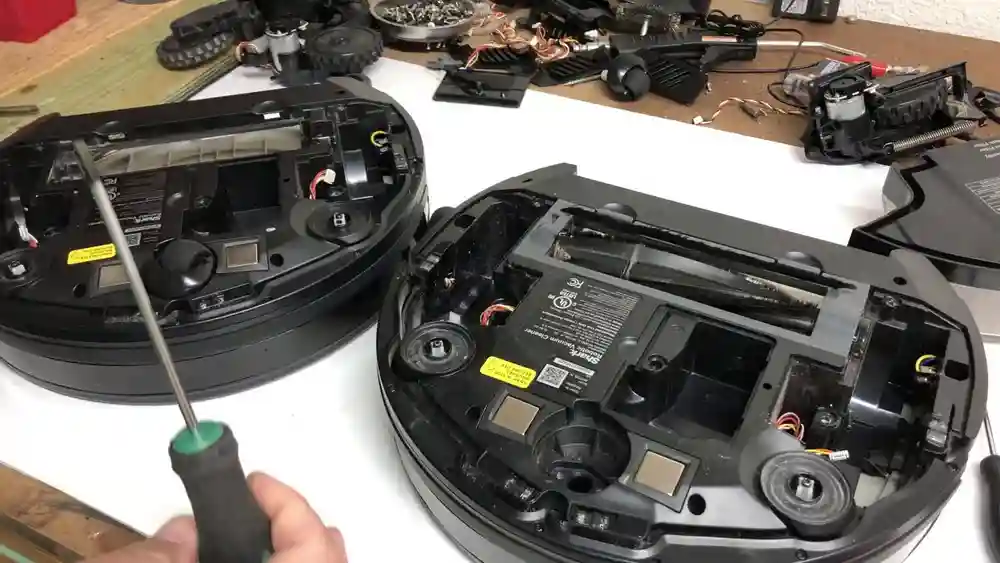
If you’re comfortable, open the robot’s shell and test the motor with a multimeter. Look for continuity across the motor terminals. If there is none, the motor is likely dead.
This process helps you find the exact cause and avoid wasting money on unnecessary parts.

Credit: www.youtube.com
How To Fix A Shark Robot Vacuum Suction Motor Not Working
Once you know the likely cause, you can try to fix the problem. Some solutions are simple and take minutes. Others require tools and patience.
1. Remove Blockages
- Use tweezers or a small brush to clear hair and dirt from air channels.
- Don’t use sharp objects that can damage plastic.
- After cleaning, test the motor again.
2. Clean Or Replace Filters
- Wash foam filters every 1-2 months.
- Replace HEPA filters every 6-12 months.
- Never run the robot without filters—they protect the motor.
3. Empty And Reinstall The Dustbin
- Make sure the bin is seated firmly.
- Clean any dust on the bin’s contacts or sensors.
4. Reset The Robot
- Hold down the power button for 10 seconds, or use the reset pinhole (depends on model).
- Reconnect to Wi-Fi if needed.
5. Fix Power Connections
- Open the robot (if out of warranty).
- Reseat any loose wires or connectors.
- Use a small screwdriver to gently tighten connections.
6. Replace The Suction Motor
If the motor is dead, you’ll need a replacement. Shark does not always sell the motor as a separate part, but you can find compatible motors online.
Steps:
- Buy a motor that matches your model.
- Open the robot’s shell with a screwdriver.
- Disconnect the old motor’s wires.
- Remove any screws holding it in place.
- Install the new motor, connect wires, and reassemble.
Take photos as you go, so you remember where each part belongs.
7. Replace The Mainboard (if Needed)
If power isn’t reaching the motor, the mainboard could be faulty. This is a harder repair—many users prefer to seek professional help or replace the robot.
8. Dry Out Water Damage
If you suspect water, open the vacuum and let it dry for 48 hours before trying to run it again. Corrosion may require cleaning with isopropyl alcohol.
9. Replace Broken Fans Or Impellers
If the motor spins but there is no airflow, the internal fan may be broken. Some skilled users can swap out just the fan, but usually, replacing the whole motor is easier.
10. Seek Professional Service
If the robot is under warranty, contact Shark’s support for repair or replacement. DIY repairs can void the warranty, so check before opening the device.
Maintenance Tips To Prevent Future Suction Motor Problems
Prevention is always better than repair. Here’s how to keep your Shark robot vacuum’s suction motor healthy for years:
1. Clean Filters Regularly
Wash and replace filters on schedule. Mark your calendar if you forget.
2. Empty The Dustbin After Every Use
A full bin chokes the motor. Make it a habit to empty it, even after small jobs.
3. Keep Air Ducts Clear
Every month, remove the bin and brush roll, and check for hidden hair or dust.
4. Avoid Wet Floors
Never let your robot run on damp surfaces. Moisture is deadly for motors and electronics.
5. Charge With Care
Always use the official charger. Power surges or the wrong charger can damage the motor control board.
6. Check For Software Updates
Sometimes, manufacturers release bug fixes that help with motor errors.
7. Store In A Dry, Cool Place
Avoid storing the robot in humid or hot locations (like bathrooms or garages).
8. Don’t Overwork The Robot
If you have a large or very dirty home, run the robot in short sessions. Long, heavy jobs can overheat the motor.
9. Inspect For Wear
Every few months, look inside for loose wires, worn brushes, or cracked parts.
10. Use Genuine Parts
When replacing filters or motors, use real Shark parts or reputable brands. Cheap parts can fail quickly or damage the robot.
Comparing Shark Robot Vacuum Models: Which Are More Prone To Suction Motor Issues?
Not all Shark robot vacuums are built the same. Some models are more reliable, others have known problems with their suction motors. Here’s a comparison of popular models and their typical issues:
| Model | Motor Reliability | Common Issues | Average Repair Cost |
|---|---|---|---|
| Shark ION R75 | Good | Filter clogs, loose bin | $40 - $60 |
| Shark IQ RV1001AE | Average | Sensor errors, fan breakage | $60 - $100 |
| Shark AI Ultra | Excellent | Rare motor failure | $50 - $90 |
| Shark EZ Robot | Fair | Dustbin connection issues | $40 - $70 |
As you can see, higher-end models tend to have fewer motor issues, but all need regular maintenance to avoid problems.
How Does Shark Compare To Other Brands For Suction Motor Reliability?
You might wonder if other robot vacuums are less likely to have suction motor problems. Here’s a comparison of Shark, iRobot Roomba, and Eufy:
| Brand | Average Suction Motor Lifespan | Ease of Motor Replacement | Typical Repair Cost |
|---|---|---|---|
| Shark | 2-4 years | Moderate | $40 - $100 |
| Roomba | 3-5 years | Easy | $50 - $120 |
| Eufy | 2-4 years | Moderate | $45 - $90 |
Roomba robots usually have easier-to-replace motors, but they cost more. Shark offers good reliability, especially for the price. Regular cleaning makes the biggest difference, no matter the brand.
When To Repair And When To Replace Your Shark Robot Vacuum
Sometimes it’s hard to decide if you should fix your vacuum or buy a new one. Here’s how to decide:
Repair
- The robot is less than three years old.
- The problem is a simple clog, dirty filter, or loose wire.
- Replacement motors cost less than half the price of a new robot.
- You enjoy DIY repairs.
Replace
- The robot is over five years old.
- Multiple parts are failing (motors, sensors, wheels).
- The mainboard is dead (expensive to fix).
- Repair costs are more than 60% of a new model.
- You want better features (mapping, voice control).
If you’re unsure, get a repair estimate before buying new. Sometimes, a $40 motor swap can add years of life.
What Most Beginners Miss When Troubleshooting
Even tech-savvy users often miss these two key insights:
- Filter clog is the #1 reason for “dead” motors. Many people think their motor is dead when it’s just starved for air. Always check and wash filters first.
- A misaligned dustbin can stop suction. If the bin isn’t seated just right, the vacuum won’t create suction—even if the motor is fine. Remove and reinstall the bin carefully.
Don’t skip these steps before replacing expensive parts.
Real-world Examples: Diagnosing And Fixing Suction Motor Problems
Let’s look at two real cases:
Example 1: Sudden Loss Of Suction
Maria noticed her Shark ION R75 left crumbs behind. The motor sounded normal. She checked the filters, which were clogged with pet hair. After washing and drying them, suction returned to normal.
Lesson: Cleaning filters solved the problem—no need to replace the motor.
Example 2: Silent Motor After Mop Water Spill
James’s Shark IQ RV1001AE stopped making noise after running over a wet spot. He opened the vacuum, found moisture inside, and let it dry for two days. The motor worked again, but he cleaned the contacts with alcohol to prevent rust.
Lesson: Water damage can cause temporary failure. Drying and cleaning can fix it if done quickly.
Do’s And Don’ts For Shark Robot Vacuum Motor Troubleshooting
Do:
- Turn off and unplug before opening.
- Keep filters clean.
- Take photos when disassembling.
- Test with a fresh battery.
Don’t:
- Run without filters (damages the motor).
- Use metal tools inside the robot.
- Ignore burning smells.
- Force connectors or wires.
Following these rules will help you avoid mistakes and fix your robot safely.

Credit: www.amazon.com
Professional Repair Vs. Diy: What Should You Choose?
If you are comfortable with tools and can follow instructions, DIY repair can save money. Most Shark robot vacuum motors are accessible with basic screwdrivers.
Choose DIY if:
- The robot is out of warranty.
- The repair is simple (filter, bin, loose wire).
- You can buy quality replacement parts.
Choose professional repair if:
- You’re not sure what’s wrong.
- The mainboard or multiple parts are damaged.
- You want to keep the warranty.
Professional repair shops can diagnose and fix complex problems, but labor costs add up.
For more information about robot vacuum maintenance, visit the official Shark support site.
Frequently Asked Questions
What Should I Do If My Shark Robot Vacuum Has No Suction But The Brush Spins?
First, empty the dustbin and clean all filters. Check for blockages in the air ducts and make sure the dustbin is seated properly. If everything looks fine, listen for the suction motor—if it’s silent, the motor may need repair or replacement.
How Often Should I Clean The Filters In My Shark Robot Vacuum?
Wash foam and felt filters every month, and replace HEPA filters every 6-12 months. If you have pets or allergies, clean more often. Dirty filters are the top cause of suction loss.
Is It Safe To Replace The Suction Motor Myself?
If your vacuum is out of warranty and you’re comfortable with small tools, yes. Always unplug the robot, take photos during disassembly, and use the correct replacement motor. If you’re unsure, seek professional help.
Can A Weak Battery Cause The Suction Motor Not To Work?
Yes. If the battery is low or failing, the motor may not get enough power. Try charging fully or swapping in a fresh battery before replacing the motor.
Will Water Damage Permanently Ruin The Suction Motor?
Not always. If you dry the vacuum quickly (within 48 hours) and clean any corrosion, the motor can sometimes be saved. However, water can cause lasting damage to electronics and moving parts, so prevention is best.
Your Shark robot vacuum is a smart tool, but like any machine, it needs care. With these steps, you can diagnose, fix, and prevent suction motor problems—so your floors stay clean and your robot keeps working for years to come.