How Do You Insert The Duo Shark Power Fins Battery
If you’ve just bought a Duo Shark vacuum with Power Fins, you’re probably excited about its strong suction and advanced features. But before you start cleaning, you need to know how to insert the battery correctly. Many first-time users worry about damaging the battery or the vacuum by making a mistake. Others find the process confusing, especially if the instructions are unclear or missing. This guide will walk you through every step, show you what to watch out for, and share tips that even experienced Shark users might not know. Whether you’re a new owner or helping someone else, you’ll finish this article knowing exactly how to insert the battery safely and effectively. And you’ll also learn simple ways to keep your battery working well for a long time.
Understanding The Duo Shark Power Fins Battery
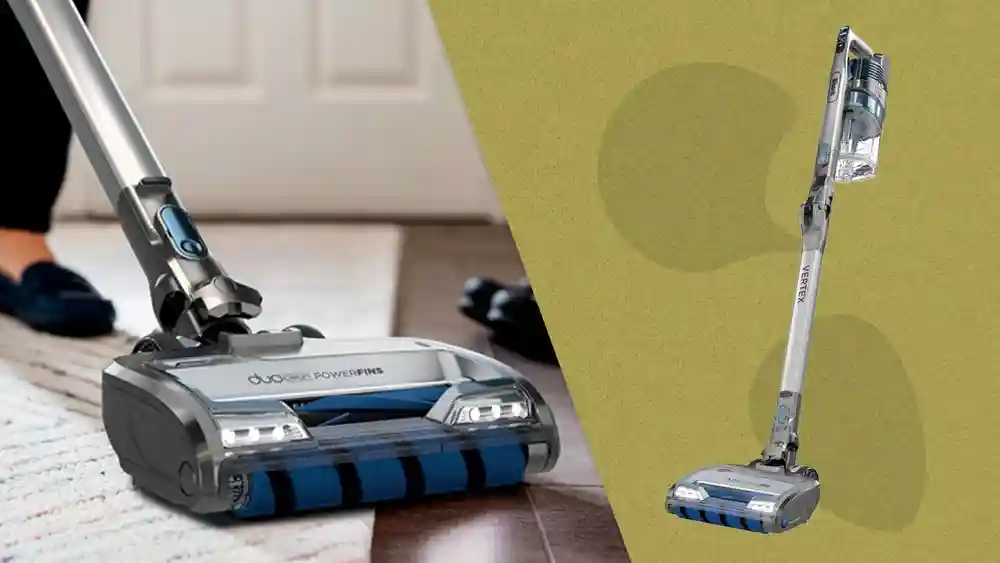
Before you handle the battery, it’s useful to know a few basics about Duo Shark Power Fins models and their batteries. These cordless vacuums use a lithium-ion battery pack that’s designed for high performance and long life. The battery is removable, which means you can swap it out or charge it separately from the vacuum. This feature is one reason why Shark vacuums are so popular. If you ever need to clean a bigger area, you can simply buy a spare battery and keep going.
A lithium-ion battery needs careful handling. It delivers powerful cleaning but can be sensitive to moisture, heat, and improper insertion. Each battery is shaped to fit in only one way, with clear contacts that connect to the vacuum’s power system.
If you try to force it or insert it backwards, you can damage the contacts or the battery itself. For Duo Shark Power Fins, the battery design is usually rectangular, with a set of metal contacts on one end. The shape guides you to insert it the correct way, but it’s still important to check alignment each time.
Key Features Of Shark Power Fins Battery
- Removable design for easy swapping and charging
- Built-in indicator lights to show charge status
- Secure locking system to prevent accidental removal
- Safety features to prevent overheating and overcharging
- Often, a textured grip or arrows for easier handling
These features help make the battery both powerful and safe—but only if you use it the right way. One small detail: the indicator lights often flash when charging, and turn solid when fully charged. Some users miss this and think the battery isn’t working. Always check the manual for your model if you are unsure.
Getting Ready: What You Need Before Inserting
To insert the Duo Shark Power Fins battery safely, a little preparation helps. Here’s what you should have ready:
- Battery: Fully charged (or at least partially charged) Shark Power Fins battery
- Vacuum: The main body of your Shark vacuum, turned off
- Clean, dry hands: Moisture can damage battery contacts
- Flat workspace: To avoid dropping the battery or vacuum
Never insert the battery if it looks damaged, swollen, or wet. If you see any cracks or leaking fluid, contact Shark customer support before using the device. For example, if you just unpacked your vacuum and the battery has a strange smell or greasy spots, don’t risk it—get a replacement.
It’s also a good idea to keep the charger nearby. If your battery is low or not working, you can quickly check if charging solves the problem. Beginners often forget this step and get frustrated when the vacuum doesn’t start.
Step-by-step Guide: How To Insert The Battery
Now, let’s go through the actual steps to insert your Duo Shark Power Fins battery. The steps below are based on the most common Shark cordless models with Power Fins, but always check your specific manual if you’re unsure.
1. Locate The Battery Compartment
Most Duo Shark vacuums have the battery compartment on the lower back or underside of the main unit. There’s usually a release latch or sliding door. Look for a small symbol that looks like a battery or a latch you can press. Some models also have a small groove or textured area to help you find the compartment easily. For new users, holding the vacuum sideways can make it easier to spot the battery slot.
2. Prepare The Battery
Hold the battery by the sides. Look for the metal contacts—they should be clean and shiny. If there’s dust, gently wipe it off with a dry cloth. Do not use water or cleaners. If you see any black marks or buildup, a soft pencil eraser can help remove it.
Check the battery for any loose parts or cracks. Beginners sometimes miss small dents, which can cause connection problems.
3. Align The Battery
Position the battery so the contacts line up with the contacts inside the compartment. The battery shape usually prevents you from inserting it the wrong way, but check that the arrows or notches line up. If your model has arrows, match them up before sliding in.
For some models, the battery label should face outward.
4. Insert Firmly
Slide or push the battery into the compartment. You should feel a slight resistance, then a click as it locks in place. Do not force it—if it doesn’t fit easily, double-check the alignment. If you feel too much resistance, remove and try again.
Sometimes, a small piece of packaging material can get stuck in the slot—check for this if you have trouble.
5. Secure The Latch
If your model has a latch or door, make sure it snaps shut. This keeps the battery from falling out during use. For vacuums with a sliding door, push firmly until you hear a click. If the latch doesn’t close, don’t use the vacuum—recheck the battery placement.
6. Check The Power Indicator
Most Shark batteries have LED lights that flash or light up when inserted. This tells you the battery is connected correctly. If no lights appear, remove the battery and try again. For some models, the vacuum itself has a power indicator that turns on when the battery is inserted.
If you see a red light, check the manual—it could mean low power or a connection issue.
7. Test The Vacuum
Turn on your vacuum to make sure it powers up. If it doesn’t, remove the battery and repeat the steps. If it still doesn’t work, try charging the battery or consult your manual. Sometimes, the vacuum won’t start if the battery is not fully clicked in, so always check for the click sound.
Example
Imagine you have a Shark IZ462H Power Fins vacuum. The battery slot is on the back. You hold the battery, align the arrow on the battery with the arrow on the slot, and slide it in. You hear a click, the light blinks, and your vacuum is ready to go. If the battery is new, the first click might feel a little stiff—this is normal.
Common Problems And Solutions
Even if you follow every step, things can go wrong. Here are some common issues and what to do:
Battery Won’t Go In
- Possible causes: Wrong alignment, debris in the slot, wrong battery model
- What to do: Remove the battery, check for obstructions, and realign. Never force the battery. Sometimes, new batteries have a small plastic protector on the contacts—remove it before inserting.
No Power After Insertion
- Possible causes: Dead battery, dirty contacts, improper insertion
- What to do: Charge the battery fully, clean the contacts with a dry cloth, and try again. If the battery is old, it might not hold charge—try a spare if you have one.
Battery Feels Loose
- Possible causes: Latch not closed, worn compartment
- What to do: Ensure the latch is fully closed. If it still feels loose, contact Shark support. Over time, the latch can wear out, especially if batteries are swapped often.
Battery Stuck Inside
- Possible causes: Damaged latch, battery swelling
- What to do: Gently wiggle the battery while holding the release button. Do not use tools. If the battery is swollen, don’t force it—seek professional help.
These issues are rare if you follow the correct steps. If you’re unsure, it’s better to call Shark’s helpline than to risk damage. Some users try to pry out stuck batteries with metal tools—this can cause shorts and damage. Always use your hands.
Tips For Safe And Long-lasting Battery Use
Many users focus on how to insert the battery but forget about caring for it. Proper care can make your Power Fins battery last years longer.
Charging Tips
- Always use the original Shark charger.
- Avoid charging the battery in extreme heat or cold.
- Unplug the charger once the battery is full.
- Try not to charge right after heavy use—let the battery cool for 15–30 minutes first.
Storage Advice
- If you won’t use the vacuum for a month or more, store the battery at about 50% charge.
- Keep the battery out of direct sunlight and away from moisture.
- Store batteries in a box or drawer, not loose in a bag.
Cleaning Contacts
- Every month, gently wipe the battery contacts with a dry cloth.
- Avoid touching contacts with your fingers to prevent oil buildup.
- For stubborn dirt, use a soft brush or cotton swab.
Avoiding Damage
- Never use a swollen or leaking battery.
- Don’t drop the battery or expose it to water.
- If the battery gets hot during use, stop and let it cool.
Expert Insight
A beginner mistake is leaving the battery in the charger for days. This can reduce battery life over time. Another common error is storing the battery in the vacuum in a hot closet—heat is a big enemy of lithium-ion cells.
It’s also wise to check battery health every few months, especially if you use your vacuum daily.
Comparing Shark Power Fins Batteries To Other Models
You might wonder how the Duo Shark Power Fins battery compares to batteries in other Shark or cordless vacuum models. Here’s a quick look:
| Model | Battery Type | Run Time (min) | Removable? |
|---|---|---|---|
| Shark Power Fins (DuoClean) | Lithium-ion | 40-60 | Yes |
| Shark Rocket Pro | Lithium-ion | 35-40 | No |
| Dyson V11 | Lithium-ion | 60 | Yes |
As you can see, the Duo Shark Power Fins battery has a longer run time and is easier to swap than some older Shark models. For example, Shark Rocket Pro batteries are built-in, so you must charge the whole vacuum.
Duo Shark lets you keep spare batteries ready.

Credit: www.amazon.com
Signs You’re Inserting The Battery Correctly
If you’re unsure whether you’ve done it right, look for these signs:
- Click sound when the battery locks in
- LED lights flash on the battery or vacuum
- No wobbling when you shake the vacuum gently
- Vacuum powers up with no delay
- Latch or door closes easily
If any of these are missing, double-check your steps. For extra assurance, run the vacuum for a minute and check if the battery stays cool.
What If You Have A Spare Battery?
Some users buy a second battery for longer cleaning sessions. Here’s how to manage two batteries:
- Label each battery with a sticker (e.g., “A” and “B”) to track usage
- Rotate batteries so they wear evenly
- Store the unused battery in a cool, dry place
- Charge both batteries regularly, even if you don’t use one for a while
This system helps you avoid one battery wearing out faster than the other. If you use one battery much more, it can lose capacity faster. Rotating keeps both working longer.
Safety Warnings And What To Avoid
Lithium-ion batteries are powerful but require respect. Here are the main safety warnings:
- Do not insert a wet or damp battery
- Never use a battery that has been dropped from a height
- Do not try to open or repair the battery yourself
- Keep batteries away from children and pets
- Never short the battery contacts with metal objects
If you see smoke, swelling, or leaking fluid, move the battery outside and call Shark support immediately. Even a small crack can be dangerous.
Shark Power Fins Battery Maintenance Schedule
Following a routine helps your battery last longer and stay safe.
| Task | Frequency | Details |
|---|---|---|
| Charge fully | After each use | Use the original charger only |
| Clean contacts | Monthly | Dry cloth only |
| Inspect for damage | Every 2-3 months | Check for swelling, cracks |
| Rotate batteries | If you own multiple | Alternate use regularly |
| Store at 50% charge | When unused for long periods | Protects battery health |
Troubleshooting Table: Quick Reference
If you run into problems, use this quick troubleshooting table to find solutions fast.
| Problem | Possible Cause | Action |
|---|---|---|
| Battery won’t insert | Wrong alignment, debris | Recheck alignment, clean slot |
| No power after insertion | Battery not charged | Charge battery fully |
| Battery loose | Latch not closed | Close latch securely |
| Battery stuck | Swelling or latch jammed | Wiggle gently, contact support if needed |
| Battery hot after use | Heavy use or internal issue | Let cool, check for swelling |
Real-world Example: Inserting The Battery For The First Time
Let’s look at a typical scenario. Maria just bought a Shark Power Fins vacuum. She unpacks it, finds the battery, and wants to insert it.
- Maria places the vacuum on a table.
- She holds the battery by the sides, checks the contacts, and aligns the battery with the compartment.
- She slides it in gently, hears a click, and sees the battery light blink.
- Maria closes the latch and turns the vacuum on—it works perfectly.
Maria avoided two common mistakes: she didn’t force the battery, and she checked the power before starting to clean. She also made sure her hands were dry and used a flat surface, which is smart for beginners.
If Maria had found the battery wouldn’t fit, she would have checked for debris or packaging material. If no lights appeared, she would have tried charging before calling support.
Credit: support.sharkninja.com
Insights Beginners Usually Miss
Many first-time users don’t realize that the battery should not be left in the charger for days. Overcharging shortens battery life. Another common oversight is using the vacuum until the battery is completely dead every time. It’s better to recharge when you hear the first “low battery” warning, which protects the battery’s lifespan.
Also, some users forget that battery contacts can get dirty even if the vacuum looks clean. A quick monthly wipe can prevent connection issues and extend the battery’s life. It’s also wise to check the compartment for dust or pet hair, especially if you clean often.
Beginners sometimes don’t notice if the latch doesn’t click. If the battery is loose, it can fall out during use. Always double-check after inserting.
When To Replace The Battery
No battery lasts forever. Here are signs you may need a new one:
- The vacuum runs for much less time than before
- Battery feels hot after charging
- The battery takes much longer to charge
- Power cuts out suddenly during use
- Battery will not hold any charge
If you see these signs, order a replacement from an official Shark dealer. Using unofficial batteries can void your warranty and even be dangerous. Shark batteries have safety features—cheap copies may not.
How To Dispose Of Old Batteries Safely
Lithium-ion batteries must not go in the regular trash. Most cities have special recycling programs for batteries. Take your old battery to an approved recycling center or electronics store. This keeps harmful chemicals out of the environment.
You can learn more about battery recycling at the official EPA battery recycling page.
Frequently Asked Questions
What Should I Do If The Battery Won’t Click Into Place?
First, double-check the alignment. The battery only goes in one way. If it still won’t click, check for dust or debris in the slot. Gently clean it with a dry cloth. If the problem continues, you might have a damaged latch or battery—contact Shark support.
Can I Use A Different Shark Battery In My Power Fins Vacuum?
No, you should only use the battery model designed for your specific Duo Shark Power Fins vacuum. Other Shark batteries may look similar but can have different voltage or shapes, which can damage your vacuum.

Credit: www.sharkninja.com
How Long Should I Charge The Battery Before First Use?
Charge the battery until the indicator light shows it’s full—usually about three hours. This helps maximize the battery’s lifespan and gives you the best cleaning performance right away.
Is It Safe To Leave The Battery In The Vacuum When Not In Use?
Yes, it’s safe for short periods. However, if you won’t use the vacuum for several weeks, remove the battery and store it in a cool, dry place. This prevents slow discharge and protects battery health.
What If The Battery Gets Wet?
Remove the battery immediately and dry it with a towel. Do not try to use or charge it. Place it in a dry area for at least 48 hours. If you see any swelling, discoloration, or leaks, recycle the battery and buy a new one.
You’re now ready to use and care for your Duo Shark Power Fins battery like an expert. These steps will keep your vacuum running strong and your home spotless for years to come. With careful handling and a little routine care, you’ll enjoy the best performance—and avoid problems that catch many beginners by surprise.