How Long Does A Dyson V8 Battery Last
A cordless vacuum like the Dyson V8 makes cleaning easier than ever, but its battery life is a major concern for most users. If you’re thinking about buying a Dyson V8 or already own one, understanding how long its battery lasts is important. Battery life affects everything from cleaning time to replacement costs. Many people believe the Dyson V8 battery lasts forever, while others think it wears out quickly. The truth is somewhere in the middle—and depends on several factors.
This guide explores the real-world Dyson V8 battery life, what affects its performance, when to expect a replacement, and practical tips to get the most from your vacuum. Whether you’re a new Dyson owner or considering an upgrade, you’ll find clear, trustworthy answers here.
1. Typical Runtime Per Charge
The Dyson V8 uses a lithium-ion battery, which is known for its energy efficiency. When fully charged, the battery offers two main runtime options based on the vacuum’s power mode:
- Standard mode: Up to 40 minutes of cleaning time with non-motorized tools.
- Max mode: About 7 minutes of high-power suction.
If you use the motorized brush bar, the runtime drops to around 25 minutes. Most people find the standard mode enough for regular cleaning, but tough jobs may need the max mode, which uses more energy. It’s best to switch between modes as needed to get the most from each charge.
A common mistake is thinking the vacuum will always run for 40 minutes. This time is only possible without powered tools and on low power. Using attachments or high-power modes reduces runtime.
2. Battery Lifespan In Years
How many years does a Dyson V8 battery last before you need to replace it? With normal use, the battery typically lasts between 3 to 5 years. This means you’ll get hundreds of cleaning cycles before noticing a drop in performance.
Several factors affect battery lifespan:
- Frequency of use (daily use shortens lifespan)
- Power mode used most often (max mode causes faster wear)
- Storage conditions (extreme heat or cold can damage batteries)
Some users find their battery still works well after five years, especially if they use standard mode and follow good charging habits. Others may need a replacement after just two years if the vacuum is used heavily or left plugged in constantly.
The key is to follow best practices and avoid common mistakes that shorten battery life.
3. Charging Time And Process
Fully charging the Dyson V8 battery takes about 5 hours from empty to 100%. The vacuum is designed to stop drawing power once the battery is full, which helps protect battery health. You can leave the vacuum on the charger without worrying about overcharging.
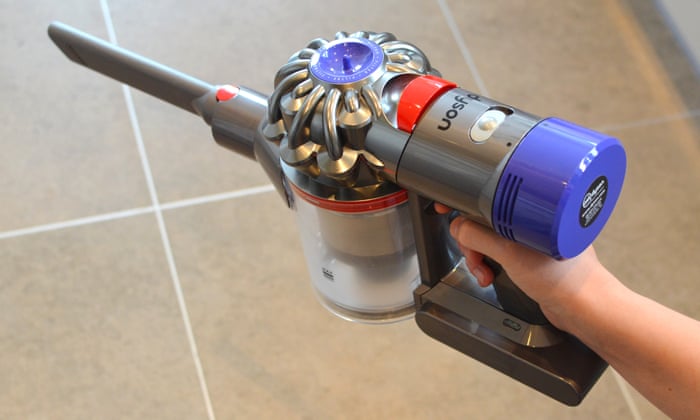
To charge, simply place the vacuum in its wall-mounted dock or plug the charger directly into the vacuum’s port. A blue light indicates charging, and it turns off when the battery is full.
A less obvious tip: Try to charge the vacuum after it cools down from use, not immediately. Charging a hot battery can reduce its lifespan over time.
4. Signs Your Battery Needs Replacement
Batteries don’t last forever. It’s important to know when your Dyson V8 battery is wearing out. Watch for these common signs:
- Short runtime: If your vacuum runs for less than half the usual time, the battery may be failing.
- Won’t hold a charge: The battery drains quickly, even after a full charge.
- Flashing red light: The vacuum shows a blinking red light, signaling a battery issue.
- Sudden shutoff: The vacuum turns off suddenly, even when the battery indicator shows a charge.
If you notice these problems, replacing the battery is usually the best solution. Avoid using the vacuum on max mode all the time, as this wears out the battery faster.

Credit: www.amazon.com
5. Factors That Affect Battery Life
Several things can help or harm your Dyson V8 battery over its lifespan. Let’s look at the main factors:
Usage Patterns
Frequent, long cleaning sessions cause more wear on the battery. If you regularly use max mode, the battery works harder and ages faster. Short, regular cleans in standard mode will extend battery life.
Charging Habits
Leaving the vacuum plugged in all the time is safe, but it’s better for the battery to run down a bit between charges. Try not to charge after every small clean if you don’t need to.
Storage Conditions
Store the vacuum in a cool, dry place. High temperatures (over 86°F/30°C) or freezing conditions can damage lithium-ion batteries. Avoid leaving it in direct sunlight or cold garages.
Maintenance
Cleaning the vacuum’s filter and brush bar reduces the workload on the battery. A clogged filter or tangled brush makes the motor work harder, draining the battery faster.
Age
Even with perfect care, all batteries lose capacity with age. After a few years, you’ll notice shorter runtimes.
6. How To Maximize Dyson V8 Battery Life
You can get more years from your Dyson V8 battery by following a few simple tips:
- Use the right power mode: Only use max mode for stubborn dirt. Stick to standard mode for everyday cleaning.
- Charge smartly: Let the battery cool down before charging. Don’t top up after every quick clean.
- Clean the filter: Rinse the filter monthly and let it dry completely before using.
- Avoid extreme heat or cold: Store and charge the vacuum indoors, away from windows or radiators.
- Let the battery rest: If you finish cleaning, wait a few minutes before charging.
- Don’t let the battery drain fully every time: Lithium-ion batteries last longer if you charge before they reach zero.
Many people forget the effect of regular filter cleaning. A dirty filter makes the motor work harder, which drains the battery faster and creates more heat—both of which shorten battery life.
Credit: www.theguardian.com
7. Cost And Process Of Battery Replacement
Replacing a Dyson V8 battery is a straightforward process. You can buy genuine Dyson batteries or third-party versions online. Prices for official Dyson V8 batteries range from $70 to $120, while third-party batteries are cheaper but may not last as long.
To replace the battery:
- Unplug the vacuum and remove any attachments.
- Use a small screwdriver to remove the three screws holding the battery.
- Slide out the old battery and insert the new one.
- Screw the new battery in place and charge fully before first use.
Always choose a reputable brand for replacements. Cheap batteries may have safety risks or poor performance. Dyson recommends using genuine parts for the best results.
If you’re unsure, Dyson customer support can walk you through the process or direct you to an authorized repair center.
8. Comparing Dyson V8 Battery To Other Dyson Models
How does the V8 battery hold up against other Dyson cordless vacuums? Here’s a quick comparison to help you see the differences:
| Model | Max Runtime (Standard Mode) | Max Mode Runtime | Typical Battery Lifespan |
|---|---|---|---|
| Dyson V6 | 20 min | 6 min | 2-4 years |
| Dyson V8 | 40 min | 7 min | 3-5 years |
| Dyson V10 | 60 min | 8 min | 3-6 years |
| Dyson V11 | 60 min | 12 min | 4-7 years |
The V8 offers a big upgrade over the V6, with twice the runtime and a longer battery lifespan. Newer models like the V10 and V11 last even longer and have smarter battery management. However, the V8 remains a popular choice for its balance of power, runtime, and price.
Real-world Example: V8 Battery For A Family Home
Let’s say you have a medium-sized home with carpets and hard floors. If you vacuum three times a week, using standard mode for most cleaning and max mode for tough spots, the V8 battery should comfortably last for 4 years before you notice a drop in runtime.
With proper care (cleaning filters, storing correctly), you might get five years or more.
If you have pets or children, and you clean daily with max mode, expect to replace the battery after about 2–3 years. The upfront cost of a replacement battery is much lower than buying a new vacuum.
Common Misconceptions About Dyson V8 Battery Life
There are several myths about the Dyson V8 battery that can confuse buyers:
- “Leaving the vacuum on the charger ruins the battery.” Modern Dyson chargers stop charging when full, so this is safe.
- “The battery lasts for 40 minutes, no matter what.” Only true in standard mode, without powered tools. Max mode and attachments reduce runtime.
- “Only Dyson batteries are safe.” While genuine parts are safest, some third-party batteries are reliable if you check reviews and buy from trusted brands.
- “Battery memory effect is a problem.” Lithium-ion batteries don’t suffer from memory effect like older types, so you don’t need to fully drain before charging.

Credit: www.youtube.com
Quick Reference: Dyson V8 Battery Facts
Here’s a summary of key Dyson V8 battery details for quick reference:
| Feature | Details |
|---|---|
| Battery type | Lithium-ion |
| Max runtime (standard mode) | 40 minutes |
| Max runtime (max mode) | 7 minutes |
| Charge time | 5 hours |
| Expected lifespan | 3–5 years |
| Replacement cost | $70–$120 (official) |
Frequently Asked Questions
How Do I Know If My Dyson V8 Battery Needs Replacing?
The most common signs are shorter runtime, the vacuum shutting off suddenly, or a flashing red light. If your vacuum lasts less than half its original time per charge, it’s time for a new battery.
Can I Use The Dyson V8 While It’s Charging?
No, the Dyson V8 does not work while plugged in. You must wait until charging is complete before using it.
Do Third-party Batteries Work With The Dyson V8?
Many third-party batteries fit the V8, but quality varies. Use brands with good reviews and safety certifications. For best results and safety, Dyson recommends using genuine parts.
How Do I Make My Dyson V8 Battery Last Longer?
Use standard mode for most cleaning, avoid extreme temperatures, clean the filter monthly, and charge only when needed. Let the battery cool before charging for best results.
Where Can I Find More Information On Dyson Batteries?
For official details and the latest tips, visit the Dyson Support website.
The Dyson V8 battery is designed to provide years of reliable cleaning when cared for properly. By understanding how to use, charge, and maintain your vacuum, you’ll enjoy strong performance and avoid unnecessary replacements. With this knowledge, you’ll keep your Dyson running smoothly for as long as possible.