Keeping your Shark Rocket vacuum working well is not just about emptying the dust cup. One part that needs special attention is the roller—the spinning brush at the bottom. Over time, hair, dust, and string collect around it, making your vacuum less powerful and even damaging the motor. Many owners forget or avoid cleaning the roller because it looks tricky. But with the right method, anyone can do it. Knowing how to clean your Shark Rocket vacuum roller can save you money, prevent repairs, and keep your home cleaner. This guide will explain every step, give you expert tips, and help you avoid common mistakes. If you have pets, long hair, or kids at home, you’ll see even better results by cleaning your roller regularly.
Cleaning your vacuum’s roller is not just a “nice-to-do” task—it’s essential for maintaining the quality of your cleaning and protecting your investment. Even people who think their vacuum is running fine are often surprised by how much hidden buildup slows it down.
Taking a little time each month to maintain the roller means you’ll notice your vacuum picks up more dirt and your floors will look cleaner, especially in high-traffic areas. Whether your home has carpets, hard floors, or a mix of both, the roller plays a big role in suction and cleaning power.
Why Cleaning The Shark Rocket Vacuum Roller Is Important
A dirty roller isn’t just ugly—it’s a problem for your whole vacuum. When hair and debris wrap around the roller, the brush spins slower. The vacuum starts to lose suction, and it won’t pick up as much dirt from your floors.
Over time, the motor works harder, which can cause overheating or even permanent damage. In some homes, a blocked roller causes a burning smell or strange noises. Cleaning the roller at least once a month keeps your Shark Rocket performing like new.
There’s also a hygiene issue. If the roller is filled with pet hair, dust, and old food, it can spread allergens or even bacteria. For families with allergies or breathing problems, a clean roller helps keep the air healthy. Regular cleaning also extends the life of the vacuum, so you don’t have to buy a new one too soon.
Many people are surprised to see how much better their vacuum works after a simple roller cleaning.
Not cleaning the roller can also affect the lifespan of your vacuum’s filters, causing them to clog more quickly and reducing overall air flow. When filters get dirty faster, you’ll spend more money replacing them or run the risk of poor indoor air quality.
For those with small children or pets who spend time on the floor, this is even more important. A well-maintained roller helps your vacuum pick up dust mites, crumbs, and pet dander that settle deep into carpets and cracks.
Some users notice that their vacuum starts to leave behind debris or even scratches on hard floors if the roller is packed with dirt. This is because a dirty roller can't rotate smoothly and may drag sharp objects across your floors.
By cleaning it often, you avoid both poor cleaning results and accidental floor damage.
Types Of Shark Rocket Vacuum Rollers
Not every Shark Rocket is the same. There are several models, and each has a slightly different roller design. Understanding your model helps you remove, clean, and reassemble the roller correctly.
| Model | Roller Type | Special Feature |
|---|---|---|
| Shark Rocket HV302 | Bristle Brush | Classic design |
| Shark Rocket DuoClean | DuoClean Roller | Soft & bristle combo |
| Shark Rocket TruePet | Bristle Brush | Pet hair focused |
| Shark Rocket Ultra-Light | Lightweight Brush | Easy to handle |
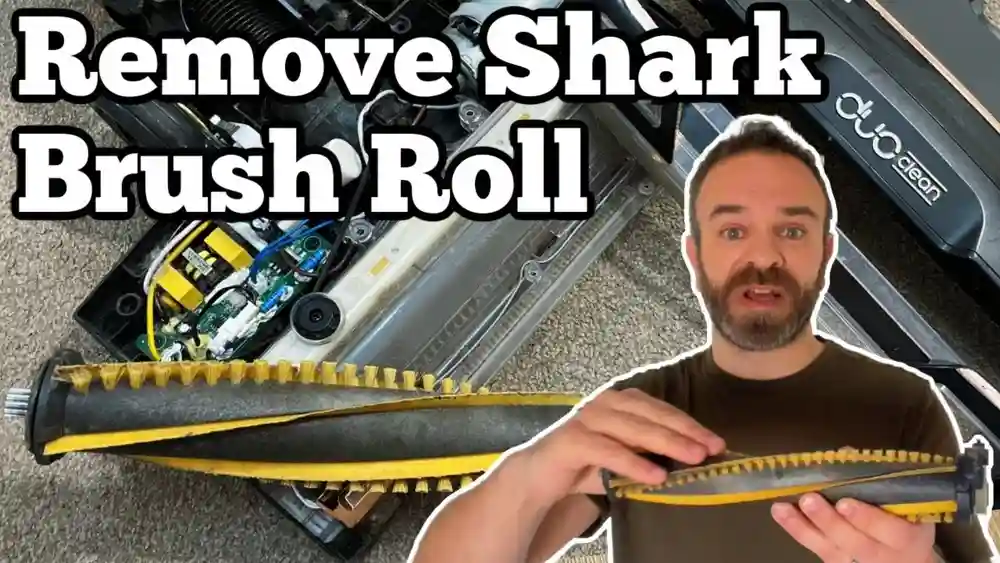
Some rollers have a mix of soft and bristle brushes. Others use just bristles. The cleaning steps are mostly the same, but DuoClean rollers need a bit more care because of the soft material.
Understanding the roller type also helps with replacement. For example, the DuoClean roller is more delicate and needs specific cleaning techniques, especially when it comes to the velvet-like section. Using the wrong cleaning tool or soaking it for too long can ruin the soft texture and reduce its cleaning power.
Meanwhile, the classic bristle brush is tougher but can still be damaged by harsh chemicals.
How To Identify Your Roller Type
- Check your vacuum’s label (bottom or back)
- Look in the manual or online
- Notice the roller’s color and texture
- DuoClean rollers usually have a soft, fuzzy part and a firm bristle part
Knowing your roller type helps you choose the right cleaning tools and avoid damage.
If you’re unsure about your roller type, a quick online search using your vacuum’s model number can help. Many manufacturers provide detailed images and part numbers. If your roller is mostly covered in soft material with only a few bristles, it’s likely a DuoClean.
If it’s all bristles with no soft part, it’s the standard type.

Credit: www.youtube.com
Tools And Materials Needed
Cleaning a vacuum roller isn’t hard, but you need some basic tools. Gather everything before you start, so you don’t have to stop in the middle.
- Phillips screwdriver – for removing the roller cover
- Small scissors or seam ripper – for cutting hair and string
- Tweezers – for grabbing trapped debris
- Soft cleaning brush – old toothbrush works well
- Microfiber cloth – for wiping dust and grime
- Mild dish soap – for washing the roller if needed
- Small bowl of warm water
- Latex or rubber gloves (optional) – for hygiene
- Vacuum user manual – for specific instructions
If you do not have all these tools, try to improvise. For example, nail scissors can work instead of small scissors. The main idea is to avoid sharp tools that might damage the roller.
Another helpful tool is a flashlight—sometimes hair and debris are hard to see, especially around the roller’s edges. Some people also use a handheld vacuum to suck away loose dust from the roller before deep cleaning. If you have sensitive skin or allergies, gloves can keep your hands clean and safe from dust mites or pet dander.
Pro tip: Keep a small bowl or zip bag nearby for screws and small parts, so you don’t lose them during the process.
Preparing Your Shark Rocket For Roller Cleaning
Before you touch the roller, make sure your vacuum is safe to handle. Many people forget these steps, but skipping them can cause accidents or break parts.
Unplugging And Power Safety
Always unplug the vacuum. Never try to remove the roller while it’s connected to power. Even if you think the power is off, unplugging is safer.
Some vacuums have a battery instead of a cord. If yours is battery-powered, remove the battery before starting. This small step avoids any risk of electric shock or accidental activation while your hands are near moving parts.
Detaching The Floor Head
- Press the release button near the neck of the vacuum.
- Gently pull the floor head away from the main body.
- Set the vacuum upright on a flat surface.
If your vacuum is lightweight, be careful not to tip it over while working. Placing the floor head on a towel or mat can help prevent scratches on your floor or countertop.
Checking For Dust And Debris
- Empty the dust cup before you start.
- Shake out any loose dirt from the brush area.
This makes the cleaning process less messy and keeps the roller from getting dirty again right away.
If your vacuum has a removable filter, it’s a good time to check and clean that too. Even though it’s not part of the roller, a clean filter improves suction and overall performance.
How To Remove The Shark Rocket Vacuum Roller
The main step is removing the roller from the floor head. For most models, this takes just a few minutes.
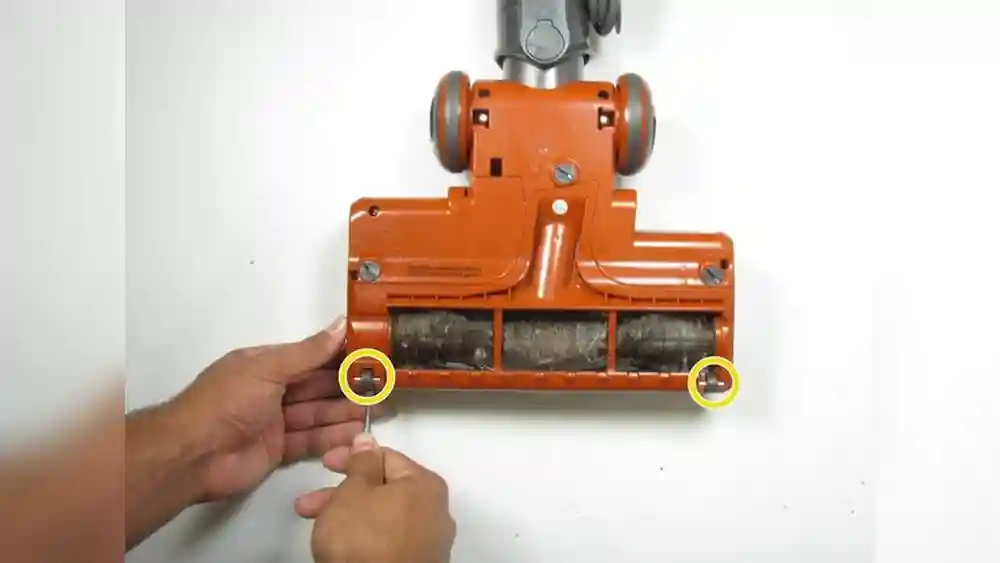
- Locate the roller cover – Usually on the bottom of the floor head, held by screws or clips.
- Remove screws – Use a Phillips screwdriver. Keep the screws in a safe place.
- Lift the cover – Some covers need gentle prying. Do not force.
- Slide out the roller – Hold both ends and pull straight out.
Some models have a quick-release button for the roller. If your model has this, push the button and pull the roller out. If you feel resistance, check for hidden screws.
Sometimes, dust and debris can make the roller stick inside the housing. If this happens, gently wiggle the roller back and forth while pulling. Forcing it out can break the end caps or damage the roller.
Roller Removal Differences In Popular Shark Rocket Models
| Model | Roller Removal Method | Special Note |
|---|---|---|
| HV302 | Screws | Check for two screws at each end |
| DuoClean | Quick-release button | Roller pops out easily |
| TruePet | Screws | Pet hair often jammed inside |
If you lose a screw, don’t panic. Most hardware stores sell replacements. Never use the vacuum with missing screws or an unsecured roller—it can damage the machine.
Some rollers have end caps that twist off. If yours does, twist gently and keep track of any small washers or spacers. These are easy to lose but important for smooth roller movement.
Step-by-step Guide To Cleaning The Roller
Cleaning the roller is the heart of this process. Don’t rush. A careful, complete cleaning gives the best results.
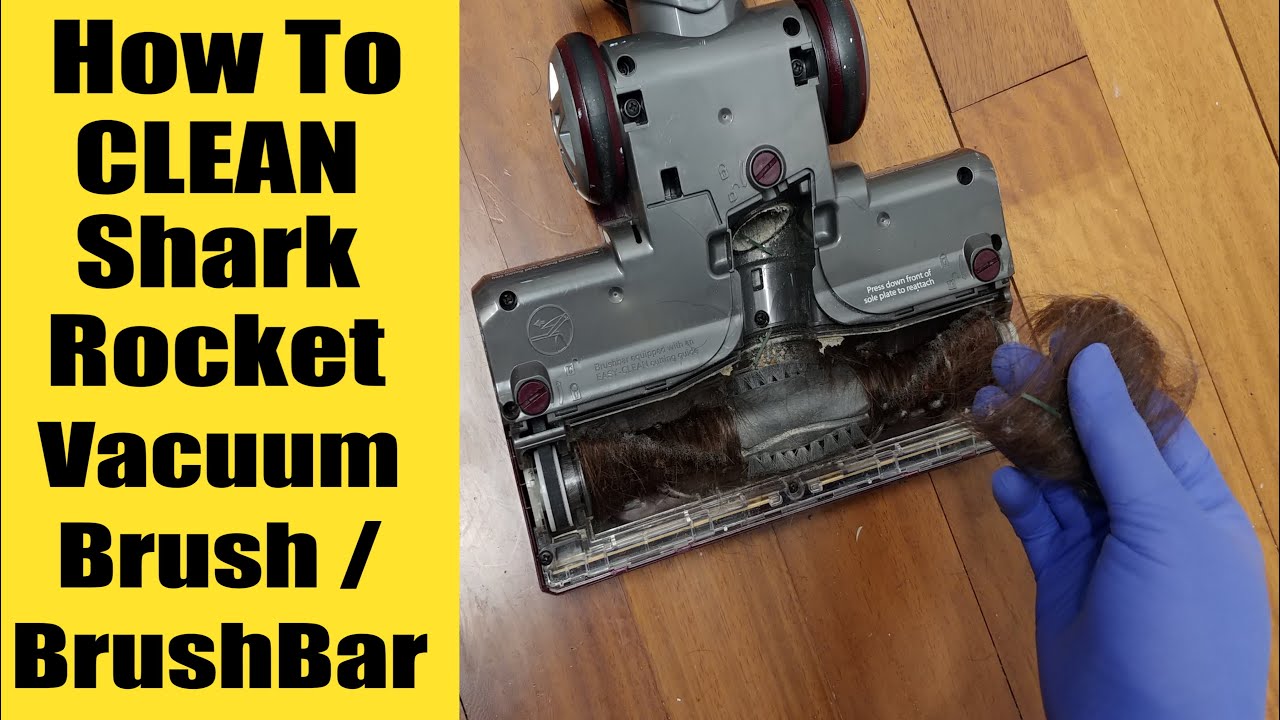
1. Remove Hair, String, And Large Debris
- Place the roller on a flat, clean surface.
- Use small scissors or a seam ripper to cut hair and threads wrapped around the brush.
- Cut along the length of the roller, not across.
- Use tweezers to pull out stubborn hair or string.
Non-obvious insight: Hair often wraps tightly at the ends of the roller, where the bearings are. Check these spots carefully, as they cause the roller to stick if not cleaned.
If the roller has grooves or deep channels, run the scissors or seam ripper along those lines. This helps you cut even the deepest tangles. For pet hair, you may need to go over the same spot more than once.
2. Brush Away Dust And Dirt
- Use a soft brush or old toothbrush to sweep away dust from the bristles.
- Brush gently to avoid bending or breaking bristles.
- Tap the roller lightly to shake out loose debris.
For DuoClean rollers, use only soft brushes on the fuzzy part to avoid damaging it.
If your roller is especially dirty, you may need to repeat brushing and tapping several times. Some people use compressed air to blow out dust from hard-to-reach areas, but do this outside to avoid a mess indoors.
3. Wash The Roller (if Allowed)
- Check your manual: Most Shark Rocket rollers can be washed, but some have parts that must stay dry.
- If safe, fill a bowl with warm water and a few drops of mild dish soap.
- Dip a microfiber cloth in soapy water, wring it out, and wipe the roller thoroughly.
- For deep cleaning, submerge the roller briefly, then scrub with the brush.
Do not soak rollers with metal ends or electrical contacts. Water can cause rust or short circuits.
For rollers with stubborn dirt or sticky spots, let the roller soak for 2-3 minutes, then use the brush again. Avoid leaving the roller in water for longer than needed, especially with DuoClean soft rollers.
4. Dry The Roller Completely
- Shake off excess water.
- Pat dry with a towel.
- Air dry the roller for at least 24 hours. Do not use a hair dryer or heater; high heat can warp plastic parts.
- Make sure the roller is 100% dry before you reinstall.
Expert tip: Place the roller in a sunny spot or near a fan for faster drying.
If you need to dry the roller quickly, stand it upright so air can reach all sides. Flip it halfway through drying to ensure both ends dry evenly. Wet rollers can cause mold or mildew inside the vacuum, so never skip this step.
5. Clean The Roller Housing
While the roller dries, clean the space inside the vacuum head:
- Wipe with a dry microfiber cloth.
- Use a brush to remove dust from corners.
- Check for stuck debris, especially at the ends where the roller sits.
This step prevents dust from getting on your clean roller right away.
A small vacuum or compressed air can help remove fine dust from tight spaces. If you see any sticky residue or buildup, use a damp cloth (not wet) to wipe it away.
6. Lubricate Roller Bearings (if Needed)
Some Shark Rocket rollers have small bearings at each end. If they look dry or squeak, add a drop of light machine oil. Wipe away any extra oil.
Beginner’s miss: Many people skip this step, but lubricating the bearings helps the roller spin freely and reduces motor strain.
Do not use thick grease or heavy oil, as these attract dust. Only a tiny drop is needed—too much oil can drip onto your floors during vacuuming.
How To Reassemble And Test Your Shark Rocket Vacuum
After cleaning and drying the roller, it’s time to put everything back. Reassembling is simple if you follow these steps.
- Slide the roller back into the housing. Make sure both ends fit into their slots.
- Replace the roller cover. Align it carefully.
- Insert and tighten all screws. Do not overtighten—this can crack the plastic.
- Reattach the floor head to the vacuum body.
- Plug in and test. Turn on the vacuum and watch the roller spin. Listen for smooth, quiet operation.
If you hear grinding or the roller does not spin, turn off and check for missed debris or misaligned parts.
After testing, check the floor for any leftover debris. If the vacuum picks up dirt easily and the roller spins smoothly, you’ve done the job well. If the roller feels stiff or doesn’t move, remove it and look for anything caught at the ends.
One helpful check: after reassembly, gently spin the roller by hand before plugging in the vacuum. It should move freely without resistance.
How Often Should You Clean The Shark Rocket Roller?
How often you clean the roller depends on your home:
- Pet owners: Once every 1-2 weeks
- Long hair in the home: Every 2 weeks
- Allergies or asthma: Weekly cleaning helps air quality
- Normal use: Every month
If you see the roller slow down, hear noises, or smell burning, clean right away.
Remember, homes with kids often have more crumbs, glitter, and craft debris that can wrap around the roller. Even if your home seems clean, regular checks can prevent hidden buildup. Some users like to set a reminder on their phone or calendar to clean the roller each month.
Troubleshooting Common Roller Problems
Sometimes, cleaning the roller does not fix everything. Here are common problems and what to do:
Roller Not Spinning
- Check for hair or string at the ends
- Make sure roller is seated correctly
- Look for blocked bearings
If the roller spins by hand but not with the motor, the drive belt may be loose or broken. Some Shark Rocket models have belts that are easy to replace, while others require professional service.
Strange Noises
- Remove roller and check for trapped debris
- Lubricate bearings
Squeaking or rattling can mean a dry bearing or a roller that’s slightly out of place. Double-check alignment before reassembling.
Burning Smell
- Stop using the vacuum immediately
- Check for a jammed roller or blocked motor
- Let the vacuum cool before restarting
A burning smell can also come from a stuck belt. If cleaning doesn’t help, check your manual for belt replacement instructions.
Roller Won’t Come Out
- Double-check for hidden screws
- Wiggle gently; don’t force
- Consult your user manual
If the roller is stuck after all screws are removed, sometimes gently tapping the side of the floor head loosens it. Never use metal tools to pry it out, as this can crack the plastic.
If you still have trouble, contact Shark customer support or visit their official website.
Special Tips For Shark Rocket Duoclean Rollers
DuoClean rollers have a soft, velvet-like part that picks up fine dust. They’re great for hard floors, but need gentle cleaning.
- Use only a soft brush on the fuzzy part
- Do not soak the roller for more than a few minutes
- Dry completely before reinstalling
- Clean more often if you vacuum flour, powder, or fine dust
A damaged soft roller can scratch floors or become less effective.
Extra care is needed when removing sticky messes from the soft roller. Dab sticky spots with a damp cloth and mild soap, then pat dry. Never use harsh chemicals or rough scrubbing pads, as these can ruin the fabric texture.
If you notice the soft roller losing its color or looking thin, it may be time for a replacement. Keeping the soft part clean also prevents streaks on shiny or dark floors.
Credit: www.homedepot.com
Deep Cleaning: When And How To Disinfect The Roller
Sometimes, you need more than a basic cleaning—especially after vacuuming up pet mess, food, or during cold and flu season.
- After removing hair and dust, wipe the roller with a cloth dipped in a 1: 10 bleach-water mix (1 part bleach to 10 parts water)
- Do not soak the roller in bleach
- Rinse with a damp cloth afterward
- Dry completely
Disinfecting kills bacteria and viruses, but do it only occasionally to avoid damaging the roller.
If you’re concerned about lingering smells (like pet accidents), you can also use a small amount of baking soda with water on a cloth to gently scrub the roller. Always rinse and dry thoroughly.
Non-obvious insight: Some users forget to disinfect the roller after vacuuming areas with mold or mildew. Always clean and disinfect if you’ve vacuumed up anything that could spread germs or allergens.
How To Tell If The Roller Needs Replacing
Even with the best cleaning, rollers wear out. Signs you need a new one:
- Bristles are worn down or missing
- Soft roller is torn or flattened
- Roller does not spin smoothly, even after cleaning
- Cracks or broken parts
Most Shark Rocket rollers last 1-2 years with normal use. Replacement rollers are available online and in stores.
If you notice the roller making loud noises or vibrating, it may be out of balance—another sign it’s time for a new one. Some models have indicator lines that show when the bristles are worn past their useful length.
Preventing Roller Problems: Pro Tips
Keeping your roller clean is easier if you follow some simple habits:
- Vacuum up large pieces before using the Rocket (paper, string, big crumbs)
- Check the roller for hair or string after every few uses
- Store the vacuum in a clean, dry place
- Avoid vacuuming wet or sticky messes
Non-obvious insight: Avoid vacuuming up rubber bands, shoelaces, or long ribbons—they wrap tightly and are hard to remove.
Another tip: teach family members not to leave small toys, jewelry, or craft supplies on the floor. These can get stuck in the roller and cause jams or scratches.
Comparing Shark Rocket Roller Cleaning To Other Brands
How does cleaning a Shark Rocket roller compare to other vacuums? Here’s a quick look.
| Brand | Roller Removal | Ease of Cleaning | Common Issues |
|---|---|---|---|
| Shark Rocket | Simple, screws or quick-release | Easy | Hair around bearings |
| Dyson V-series | Twist lock or clips | Moderate | Roller gets stuck |
| Bissell | Multiple screws | Challenging | Screws strip easily |
| Hoover | Clips | Moderate | Hard to realign roller |
Shark Rocket rollers are among the easiest to clean and maintain. If you switch brands, expect small differences in removal and cleaning steps.
For example, Dyson vacuums often have more complex roller designs with extra seals and clips. Bissell vacuums tend to use more screws, which can be frustrating if you don’t have the right screwdriver. Hoover vacuums sometimes need extra care to line up the roller correctly when reassembling.
Mistakes To Avoid When Cleaning Shark Rocket Rollers
Many beginners make small mistakes that lead to big problems. Here’s what to avoid:
- Forcing parts apart – Always check for screws or clips before pulling.
- Using harsh cleaners – Stick with mild soap; strong chemicals can damage plastic and bristles.
- Soaking electrical parts – Only wash the roller if the manual says it’s safe.
- Reinstalling while wet – Moisture can damage the vacuum’s motor or cause mold.
- Losing screws – Keep screws in a dish or baggie while you work.
- Skipping bearing checks – Hair at the ends often gets missed and causes jams.
Take your time and double-check each step for the best results.
One mistake people often make is using sharp knives to cut out hair. This can scratch or gouge the roller, making it wear out faster. Always use small, blunt-tip scissors or a seam ripper.
How To Store And Maintain Your Vacuum For Easy Roller Care
A few simple habits make future roller cleaning easier:
- Store your Shark Rocket in a dry area, away from damp or dusty spots.
- Hang the vacuum on a wall mount if you have one—this keeps the roller off the floor.
- After each use, check the roller for large items.
- Clean the roller before it gets packed with debris.
Routine care saves you time and keeps your vacuum working at its best.
If you use your vacuum for cleaning up after pets or in messy rooms, consider giving the roller a quick brush or wipe every few days. This prevents buildup and makes deep cleaning easier later.
Credit: www.youtube.com
What To Do If You Damage The Roller
Accidents happen. If you break or bend the roller while cleaning:
- Stop using the vacuum immediately.
- Order a replacement roller from the official Shark website or a trusted retailer.
- Do not try to tape or glue the roller back together—this is dangerous and can break the motor.
If your vacuum is under warranty, contact Shark customer service for help. For more information about vacuum maintenance and replacement parts, you can visit the Shark official support page.
Most replacement rollers come with easy-to-follow instructions. Installing a new roller can restore your vacuum to like-new performance. Don’t wait too long if you notice cracks or bent parts, as these can cause bigger problems for your vacuum.
Frequently Asked Questions
How Do I Know If My Shark Rocket Roller Is Washable?
Check your vacuum’s user manual. Most Shark Rocket rollers are washable, but some models have electrical contacts or metal parts that should not get wet. If you’re not sure, stick to dry brushing and wiping with a damp cloth.
If your roller has a soft velvet-like surface, wash only if the manual says it’s safe. Always allow extra drying time for DuoClean rollers.
Can I Use Vinegar To Clean My Vacuum Roller?
Yes, you can use a small amount of vinegar mixed with water to clean the roller. However, rinse thoroughly and make sure the roller is completely dry before reinstalling. Vinegar is safe for removing odors, but avoid soaking the roller in it.
Mix one part vinegar with four parts water for a gentle cleaning solution. Vinegar helps remove sticky residue and can break down some types of grime, but always test on a small area first.
Why Does My Roller Keep Getting Clogged With Hair?
This is common in homes with pets or people with long hair. Try cutting hair into shorter pieces before vacuuming, or use a vacuum designed for pet hair. Regular cleaning (every 1-2 weeks) helps prevent buildup.
Some pet owners find it helpful to use a broom or lint roller to pick up loose hair before vacuuming. This reduces the amount that wraps around the roller.
What Should I Do If The Roller Does Not Spin After Cleaning?
First, check that the roller is installed correctly and the cover is secured. Look for missed debris at the ends. If the problem continues, check the belt or contact Shark support.
If the roller spins by hand but not with the motor, the issue could be inside the vacuum head. Listen for unusual sounds or look for flashing lights on the vacuum that indicate a problem.
How Often Should I Replace The Shark Rocket Roller?
With normal use, replace the roller every 1-2 years. If you notice worn bristles, a flattened soft roller, or poor performance even after cleaning, it’s time for a new one.
If you vacuum daily or have multiple pets, you may need to replace the roller more often to keep cleaning results at their best.
Cleaning your Shark Rocket vacuum roller is a simple task that makes a big difference. With regular care, your vacuum will work better, last longer, and keep your home cleaner. Don’t wait for problems—add roller cleaning to your monthly routine and enjoy the full power of your Shark Rocket.