If you rely on a Shark steam cleaner for daily cleaning, it can be frustrating when it suddenly stops working or doesn’t perform well. Many people throw their steam cleaner away or pay for expensive repairs, not knowing that most problems are easy to fix at home. With the right steps, tools, and a bit of patience, you can get your Shark steam cleaner back in top shape—and even keep it running longer. This guide will walk you through everything you need to know, from understanding how your steam cleaner works, common problems, to in-depth repair solutions and maintenance tips. Whether you’re a first-time user or have owned your unit for years, you’ll find clear, practical advice to solve nearly every issue.
Understanding How A Shark Steam Cleaner Works
Before you start fixing anything, it’s helpful to know how a Shark steam cleaner operates. These devices heat water inside a tank to create steam, which is then pushed through a nozzle, mop pad, or brush to clean and sanitize surfaces. Steam cleaners use high temperature—not chemicals—to loosen dirt and kill bacteria.
Most Shark steam cleaners have a few key parts:
- Water tank – where you fill water
- Heating element – heats the water to produce steam
- Nozzle or mop head – delivers steam to the surface
- Power cord and controls – to operate the unit
Knowing these parts helps you find the source of a problem and decide if it’s something you can fix yourself.
Safety First: Preparing To Fix Your Shark Steam Cleaner
Before you start any repairs, always think about safety. Steam cleaners work with hot water, electricity, and pressure. If used incorrectly, they can cause burns or electric shocks.
- Unplug the cleaner and let it cool down for at least 30 minutes before opening any parts.
- Empty the water tank and release any leftover steam by pressing the steam button (with the device unplugged and cooled).
- Wear gloves if you’re handling hot or sharp parts.
- Read the manual for your specific Shark model. Each model may have small differences, so check for any warnings or instructions.
Most problems can be fixed without special tools. But having a Phillips screwdriver, a soft cloth, a toothpick or pin, and some white vinegar will help with common fixes.
Common Problems With Shark Steam Cleaners
Most users report a few common issues with their Shark steam cleaners:
- No steam or very little steam
- Water leaking from the tank or body
- Strange noises or loud hissing
- Unit not heating up
- Mop pad not getting wet
- Steam coming out in short bursts
Each of these problems can have different causes. Let’s look at each one and how to solve them.
How To Fix A Shark Steam Cleaner That’s Not Steaming
One of the most frequent problems is no steam coming out. This can be caused by a blocked nozzle, a faulty heating element, or just a lack of water.
Step 1: Check The Water Level
- Open the water tank and make sure it’s filled to the recommended level.
- Never overfill or underfill, as this can affect performance.
Step 2: Unclog The Nozzle
- Remove the mop head or nozzle.
- Use a toothpick, pin, or needle to gently clear any mineral buildup or debris from the steam holes.
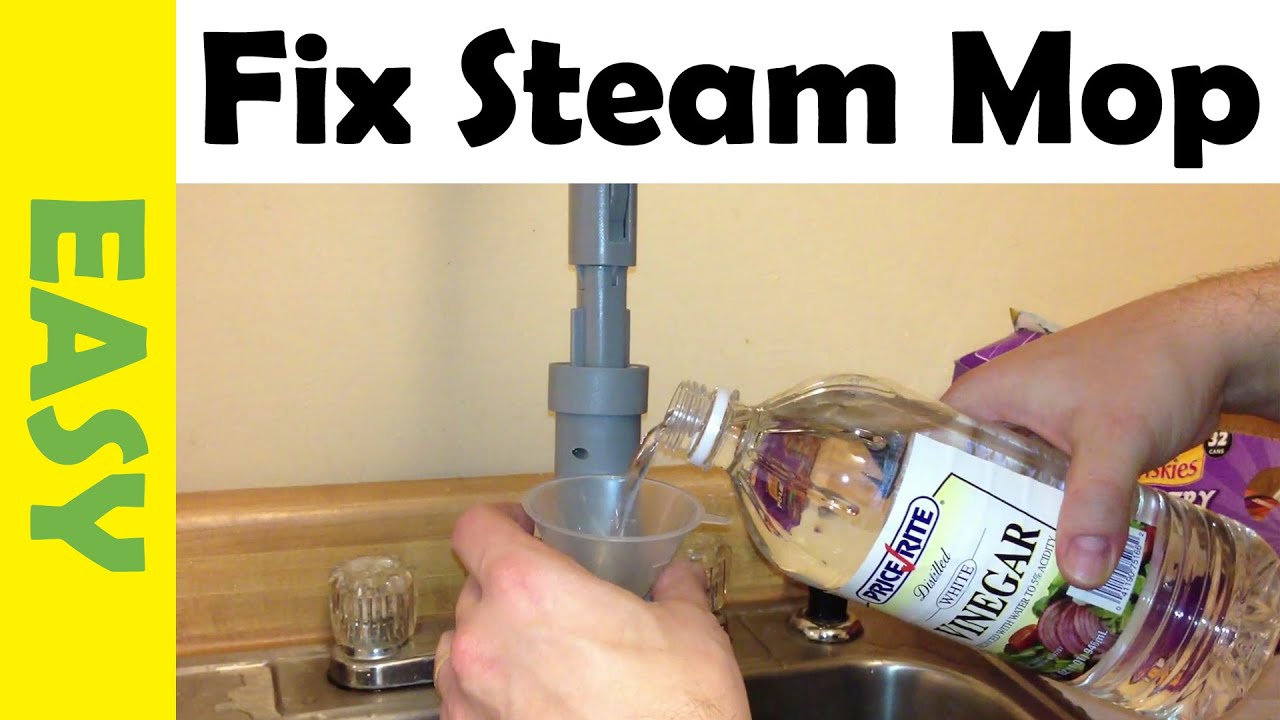
- For a deeper clean, soak the nozzle in a mix of equal parts white vinegar and water for 30 minutes. Rinse well before reattaching.
Step 3: Clean The Water Tank
- Empty the tank and rinse it with clean water.
- If you see white or brown buildup, fill the tank with vinegar and water, shake, and let it sit for 30 minutes. Rinse thoroughly.
Step 4: Check For A Faulty Heating Element
If your cleaner still doesn’t steam:
- Plug it in and listen for the sound of water heating (a soft bubbling or humming).
- If you hear nothing and the unit stays cold, the heating element may be broken. This often requires professional repair or replacement.
Step 5: Test The Steam Trigger
- Some models have a trigger or button to release steam. Make sure it isn’t stuck or jammed.
- Spray a little compressed air around the trigger area if you suspect dirt is blocking it.
Non-obvious insight: Many people forget that using hard water can cause mineral buildup in both the nozzle and the tank, reducing steam output over time. Using distilled water can prevent most clogs.
Solving Water Leaks In Your Shark Steam Cleaner
Water leaks are annoying and can cause damage to your floors or the device itself.
Step 1: Identify The Source
- Check if the leak is coming from the water tank, the mop head, or the main body.
Step 2: Check The Water Tank Cap
- Make sure the cap is screwed on tightly and the rubber gasket (seal) inside the cap is in place and not cracked.
- If the gasket is missing or damaged, you can often replace it with a similar-sized rubber washer from a hardware store.
Step 3: Inspect The Tank For Cracks
- Remove the tank and look for any small cracks or holes.
- Cracks are usually not repairable; you may need to order a replacement tank.
Step 4: Examine Connection Points
- Look at where the tank attaches to the body. If there’s a rubber seal or O-ring, check for wear or dirt.
- Clean these seals and apply a small amount of petroleum jelly to help create a better seal.
Step 5: Check Mop Pad Attachment
- If water leaks from the mop head, make sure the pad is attached correctly and is not too loose.
Non-obvious insight: Sometimes, leaks happen because the tank is overfilled or the mop pad is oversaturated. Always follow recommended fill lines and wring out pads if they become too wet.
Fixing A Shark Steam Cleaner That Won’t Heat Up
If your steam cleaner doesn’t get hot, it won’t produce steam.
Step 1: Confirm Power
- Try plugging the cleaner into a different outlet.
- Make sure the power switch or button is fully engaged.
Step 2: Inspect The Power Cord
- Look for visible damage, fraying, or loose plugs.
- If you see damage, do not use the cleaner until the cord is replaced.
Step 3: Test With A Multimeter
- If you know how, use a multimeter to check if power is getting to the heating element.
- No power? The internal fuse or wiring may be faulty.
Step 4: Reset The Cleaner
- Some Shark models have a reset button, usually on the bottom or near the power cord.
- Press and hold for 10 seconds, then try turning the cleaner on again.
Step 5: Heating Element Failure
- If all else fails, the heating element may be dead. This is difficult to replace at home, but authorized repair shops can often do it.
Dealing With Strange Noises Or Hissing
Steam cleaners make some noise, but loud hissing, banging, or popping usually signals a problem.
Step 1: Check For Air In The System
- Sometimes, air gets trapped in the tank or lines.
- Unplug the cleaner, let it cool, then remove and reattach the tank.
- Fill with water and turn on. This can help force air out.
Step 2: Clean The Nozzle
- Blockages can cause steam to build up pressure, making noise.
- Use the steps above to unclog the nozzle.
Step 3: Loose Parts
- Vibrating or rattling may mean a screw or internal part is loose.
- Gently shake the cleaner. If you hear something moving, open the main body (if possible) and check for loose screws.
Step 4: Limescale Buildup
- Mineral deposits can cause steam to spit and hiss.
- Regularly descale your unit by running vinegar and water through the system.
Fixing A Mop Pad That Stays Dry
If your mop pad stays dry, steam isn’t reaching it.
Step 1: Check The Steam Path
- Remove the mop head and look inside the nozzle. Make sure it’s clear of debris.
Step 2: Mop Pad Attachment
- Make sure the pad is properly attached. If it’s off-center, steam may miss the pad completely.
Step 3: Steam Output
- If your unit produces little or no steam, follow the steps in “How to Fix a Shark Steam Cleaner That’s Not Steaming.”
Tip: Sometimes, old or worn-out mop pads do not absorb steam well. Replace pads regularly for best results.

Credit: www.ifixit.com
Steam Comes Out In Short Bursts
Short bursts of steam instead of a steady flow usually mean a partial blockage or problem with the pump.
Step 1: Clean The Steam Path
- Unclog the nozzle and clean the tank as described above.
Step 2: Check The Pump (if Present)
- Some models have an internal pump. If you hear it clicking but not running smoothly, there may be a blockage or the pump may be failing.
- Professional servicing may be required for pump issues.
Step 3: Avoid Overfilling
- Too much water can cause inconsistent steam. Always fill to the correct line.
Maintenance Tips To Prevent Future Problems
Regular care can prevent most common issues with your Shark steam cleaner.
Use Distilled Water
- Tap water often contains minerals that build up and clog the system.
- Use distilled water whenever possible for longer life and better steam flow.
Clean Regularly
- After each use, empty the water tank and let it air dry.
- Wipe down the exterior and mop head with a damp cloth.
Descale Monthly
- Once a month, fill the tank with a 50/50 mix of white vinegar and water.
- Run the cleaner until half the tank is empty, then let it sit for 30 minutes.
- Finish running the cleaner to empty the tank. Rinse with clean water afterward.
Replace Pads And Filters
- Mop pads should be washed after every use and replaced when they become worn or stop absorbing well.
- Some Shark steam cleaners have small filters (usually near the water tank). Check the manual and replace as needed.
Store Properly
- Always store the cleaner in a dry place, away from direct sunlight or heat.
- Don’t leave water in the tank for long periods.

Credit: www.wikihow.com
When To Repair, Replace, Or Seek Professional Help
Some problems can be fixed at home, but others need professional repair or even a replacement unit.
When To Repair
- Minor leaks (gasket or seal replacement)
- Simple clogs and cleaning
- Replacing power cords (if you have electrical knowledge)
When To Replace
- Cracked water tanks or main body
- Broken heating element (unless under warranty)
- Repeated pump failure
When To Call A Professional
- Complex electrical faults
- Internal pump or wiring repairs
- Unit still under warranty (to avoid voiding coverage)
Pro Tip: Always check your warranty before opening the cleaner. DIY repairs can void coverage.
Comparing Shark Steam Cleaner Models And Their Common Issues
Not all Shark steam cleaners are built the same. Here’s a look at how popular models compare in terms of common problems and ease of repair.
| Model | Common Issues | DIY Repair Difficulty | Parts Availability |
|---|---|---|---|
| Shark Steam Pocket Mop (S3501) | Clogged nozzle, weak steam, pad attachment | Easy | High |
| Shark Genius Steam Mop (S5003D) | Leaking tank, short bursts of steam | Moderate | Medium |
| Shark Lift-Away Pro (S3973D) | No heat, water leaks, pump issues | Hard | Medium |
| Shark Steam & Scrub (S7001) | Noisy operation, pad not wetting | Moderate | Low |
Key Replacement Parts For Shark Steam Cleaners
Many common problems can be fixed by replacing a small part. Here’s a comparison of the most replaced parts and their importance.
| Part | Function | Failure Symptoms | Can Replace at Home? |
|---|---|---|---|
| Water Tank | Holds water for steam | Leaking, cracked, no steam | Yes |
| Mop Pad | Absorbs and delivers steam | Pad stays dry, poor cleaning | Yes |
| Nozzle | Directs steam to surface | Blocked, uneven steam | Yes |
| Power Cord | Provides electrical power | No power, sparking | Usually |
| Heating Element | Heats water for steam | No heat, no steam | No (professional) |
| Rubber Gasket/O-Ring | Seals tank and connections | Leaking water | Yes |
Troubleshooting Quick Reference For Shark Steam Cleaners
If you want a quick way to diagnose problems, use this chart. Find your symptom and try the suggested fix.
| Problem | Possible Cause | Suggested Fix |
|---|---|---|
| No steam | Clogged nozzle, empty tank | Clean nozzle, refill tank |
| Leaking water | Loose/missing gasket, overfilled tank | Tighten or replace gasket, correct fill |
| Unit not heating | Bad heating element, faulty cord | Check power, replace cord or element |
| Pad stays dry | Blocked steam path, worn pad | Unclog, replace pad |
| Strange noises | Limescale, trapped air | Descale, remove/reinstall tank |
Credit: www.youtube.com
Real-world Example: Fixing A Shark Steam Mop With No Steam
Let’s walk through a typical repair. Suppose your Shark Steam Pocket Mop (S3501) is plugged in, heated, but no steam comes out.
- Check the water tank – It’s full.
- Unplug and cool down the mop for 30 minutes.
- Remove the mop head. Inspect the nozzle. It looks blocked.
- Use a pin to clear the steam hole. You feel some resistance, then the pin pushes through.
- Soak the nozzle in vinegar and water for 30 minutes.
- Reassemble the mop and fill the tank with distilled water.
- Plug in and turn on. After heating, steam flows normally.
This simple fix saves time and money, and you can repeat it whenever performance drops.
Advanced Diy Repairs And When To Avoid Them
Some users are comfortable opening their devices and attempting more advanced fixes. Here’s what you should and shouldn’t try:
Safe For Diy
- Replacing gaskets, O-rings, or pads
- Cleaning and descaling
- Replacing the water tank
- Fixing loose screws or external parts
Risky (professional Help Recommended)
- Opening the main body to access wiring or heating element
- Replacing the pump or internal circuit boards
- Fixing severe leaks from inside the body
If you’re unsure, always choose safety and consult a professional or the manufacturer.
Where To Find Replacement Parts And Manuals
You can find most Shark steam cleaner parts online, through authorized dealers, or on the official Shark website. Manuals are often available as free downloads from the manufacturer. When buying parts, always match the model number to ensure compatibility.
For more help, check the official Shark support page.
How To Extend The Life Of Your Shark Steam Cleaner
With regular care, many Shark steam cleaners last for years. Here’s how to keep yours running smoothly:
- Use only distilled water
- Clean and descale monthly
- Replace worn pads and filters
- Store in a dry, safe place
- Fix small problems early, before they get worse
Many users find that with these habits, their units work better and need fewer repairs.
Frequently Asked Questions
What Kind Of Water Should I Use In My Shark Steam Cleaner?
Always use distilled water if possible. Tap water contains minerals that can clog the machine and shorten its life. Distilled water prevents most buildup and keeps your steam cleaner working efficiently.
How Often Should I Descale My Shark Steam Cleaner?
You should descale once a month if you use your cleaner regularly. If you notice reduced steam output or start to see white buildup, clean it sooner. Use a 50/50 mix of white vinegar and water for best results.
Can I Use Cleaning Solutions In My Shark Steam Cleaner?
No. Shark steam cleaners are designed for water only. Adding cleaning solutions or chemicals can damage the machine, clog the nozzle, and void the warranty. If you want extra cleaning power, use a separate spray bottle with a safe cleaner, and then use the steam mop.
Where Can I Get Replacement Parts For My Shark Steam Cleaner?
You can find replacement parts on the official Shark website, major online retailers, or authorized repair shops. Always use genuine parts for safety and best performance. Match your model number before buying.
What Should I Do If My Shark Steam Cleaner Still Doesn’t Work After These Fixes?
If none of these steps solve the problem, the issue may be with the heating element, wiring, or internal pump. At this point, it’s safest to contact Shark customer support or a professional repair service, especially if your unit is under warranty.
Getting your Shark steam cleaner back in working order is usually simple with the right steps. With regular care, cleaning, and a little troubleshooting, you’ll enjoy years of efficient cleaning—and save money on repairs. Remember, most problems are minor and can be fixed at home.
When in doubt, check your manual, use safe cleaning practices, and don’t hesitate to seek professional help for bigger issues.