Vacuuming pet hair and long human hair can be a tough job, especially if your Shark Navigator Professional stops picking up hair as it once did. Many people trust this vacuum because of its strong suction, easy handling, and reputation for dealing with hair on carpets and floors.
But when it suddenly struggles with hair pick-up, daily cleaning becomes stressful, and you may worry about deeper problems with your vacuum.
If you’re reading this, you’ve likely noticed more hair left on your floors, or perhaps the brush roll looks tangled, and the vacuum seems weaker. This problem is common, but it’s also fixable in most cases. The reasons behind it can range from simple clogs to issues with the brush roll or even maintenance mistakes that many owners don’t realize they’re making.
Let’s explore why your Shark Navigator Professional may not be picking up hair and how you can get it back to working its best. This guide will cover every possible cause, from the obvious to the hidden, and provide step-by-step solutions. Whether you have pets that shed a lot or deal with long hair daily, you’ll find practical tips, expert advice, and clear explanations to help you solve this problem for good.
Common Reasons The Shark Navigator Professional Isn’t Picking Up Hair
Understanding why your vacuum isn’t performing well is the first step. Many people blame the vacuum itself, but often, the real issue is something small and fixable.
1. Clogged Brush Roll
The brush roll (or roller brush) is the spinning part at the bottom of the vacuum. Its bristles grab hair and dirt from carpet and floors. Over time, hair can wrap tightly around it. When too much hair builds up, the brush roll can’t spin properly, which means it won’t pick up hair effectively.
Often, pet owners see this problem. Long hair—both human and animal—can tangle around the brush roll after just a few uses. This tangle acts like a rope, stopping the brush from spinning at full speed, or even stopping it completely.
2. Blocked Air Pathways
The air pathway is how the vacuum moves dirt and hair from the floor to the dust cup. If this pathway gets blocked by hair, dust, or even small objects, suction drops. Without strong suction, the vacuum leaves hair behind, especially on carpets.
Hair can also get stuck in the hose or the connection between the cleaner head and the dust cup. Sometimes, these blockages are deep inside, so you may not see them at first glance.
3. Full Or Dirty Dust Cup
When the dust cup is full, air can’t flow well through the vacuum. Even if it’s not 100% full, packed-in dirt and hair can clog the filter inside the dust cup area. This reduces suction and stops the vacuum from picking up hair efficiently.
Many people wait until the dust cup is overfilled before emptying it. But for pet owners or those with lots of hair, it’s better to empty the dust cup more often.
4. Worn Out Or Dirty Filters
The Shark Navigator Professional has filters that catch fine dust and protect the motor. If these filters are clogged with dirt and hair, airflow is blocked. This means less suction and poor hair pick-up.
Most models have two types of filters: a foam filter and a HEPA filter. Both need regular cleaning. If you forget this step, your vacuum’s performance drops over time.
5. Incorrect Height Setting
Your vacuum has a height adjustment for different floor types. If you use the wrong setting—like “bare floor” mode on a thick carpet—the brush roll may not contact the carpet deeply enough to pull up hair. The same problem happens if you use a high setting on hard floors.
Adjust the height according to the floor you’re cleaning for the best hair pick-up.
6. Faulty Or Broken Brush Roll Belt
The belt connects the motor to the brush roll, making it spin. If the belt is stretched, broken, or has slipped off, the brush roll won’t move. This is a common issue for older vacuums or those used often for hair pick-up.
A worn belt may not break immediately, but it can slip, making the brush roll spin slowly and pick up less hair.
7. Overheated Motor
If your vacuum’s motor gets too hot, it may shut down or reduce power as a safety measure. Overheating can be caused by blockages, dirty filters, or long periods of use without a break. When the motor isn’t working at full strength, suction drops, and hair is left behind.
8. Incorrect Assembly
Sometimes after cleaning or replacing parts, the vacuum isn’t put back together perfectly. If the parts aren’t assembled properly—like a loose hose or poorly fitted dust cup—air leaks can form, reducing suction and hair pick-up.
9. Old Or Damaged Brush Roll
Over time, the bristles on the brush roll wear down, get soft, or even break off. A brush roll with weak bristles can’t grab hair from carpets or floors, leaving more hair behind.
10. Hidden Obstructions In The Hose
Hair can sometimes ball up deep inside the hose. This kind of blockage isn’t always visible from the ends. If the vacuum suddenly loses suction or stops picking up hair, a hidden blockage in the hose could be the cause.
11. Hair Type And Carpet Type Mismatch
Some hair types—like very fine or very long hair—are harder for vacuums to pick up, especially from high-pile carpets. The Shark Navigator Professional is strong, but if your hair or carpet type is especially challenging, performance may drop.
12. Lack Of Regular Maintenance
Many users skip regular maintenance. Over time, hair, dust, and debris build up in different parts. Without scheduled cleaning, any vacuum will lose performance, especially with hair pick-up.
How To Fix A Shark Navigator Professional Not Picking Up Hair
Now that you know the common causes, it’s time to get hands-on. Fixing your vacuum is often much easier than you expect. Follow these steps, and you’ll likely restore your vacuum’s hair-picking power.
Step 1: Unplug And Inspect The Vacuum
Safety first. Always unplug the vacuum before any cleaning or maintenance. This prevents accidents and protects both you and the machine.
Place the vacuum on a clean, flat surface. Turn it over to inspect the brush roll and the bottom of the vacuum.
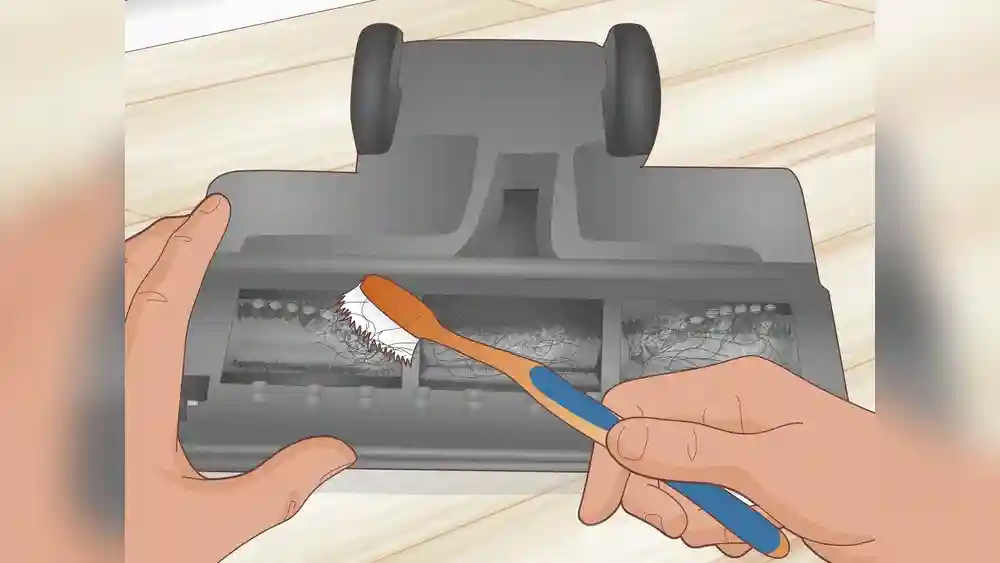
Step 2: Remove Hair From The Brush Roll
If you see hair wrapped around the brush roll, use scissors or a seam ripper to carefully cut the hair. Gently pull it away without damaging the bristles.
For stubborn tangles, work slowly and avoid pulling too hard. If the brush roll is removable (on most models it is), take it out for a deeper clean. Wash with warm water if needed, but let it dry completely before replacing.
Pro Tip: Prevent Future Tangles By Cleaning The Brush Roll Every 1-2 Weeks, Especially If You Have Pets Or Long Hair In The Home.
Step 3: Check For Blockages In The Hose And Air Pathways
Detach the hose from both the vacuum body and the cleaner head. Look inside both ends. Use a broomstick or flexible brush to push out any hidden clogs.
Don’t forget to check the short air pathway between the brush roll and the dust cup. Hair often gets stuck here, especially if you vacuum large clumps at once.
Step 4: Empty And Clean The Dust Cup
Take out the dust cup and empty it completely. Check for stuck hair or debris inside. Rinse the dust cup with water and let it dry before putting it back.
Step 5: Clean Or Replace Filters
Find the foam filter (usually below the dust cup) and the HEPA filter (often in a separate compartment). Tap loose dirt off the foam filter or wash it with warm water. Let it dry for at least 24 hours.
For the HEPA filter, check the manufacturer’s instructions. Some can be tapped clean, but others need replacing every 6-12 months. Using a dirty or old filter is a top reason for lost suction.
Step 6: Adjust The Height Setting
If your vacuum has a height adjustment dial, make sure it matches your floor type. For low-pile carpets or hard floors, use a low setting. For thick carpets, use a higher setting. This helps the brush roll grab hair more effectively.
Step 7: Inspect And Replace The Belt If Needed
Check if the belt is loose, broken, or has come off its track. If you notice the brush roll isn’t spinning even after cleaning, the belt is likely the problem. Replacement belts are inexpensive and easy to install. Follow the manual or a trusted YouTube guide for your specific model.
Step 8: Check All Connections And Assembly
Double-check that all parts are fitted tightly: hose, dust cup, filters, and cleaner head. Even a small air leak can lower suction.
Step 9: Examine The Brush Roll’s Condition
If your brush roll has soft, missing, or bent bristles, it’s time to replace it. A fresh brush roll grabs hair much better than an old one.
Step 10: Look For Hidden Hose Blockages
If you still notice weak suction, try running a small flashlight through the hose. If light doesn’t pass through, there’s likely a blockage you missed. Push it out gently.
Step 11: Match Hair And Carpet Type With Proper Technique
If your hair type or carpet is especially tough, you may need to vacuum more slowly, go over each area twice, or use the vacuum’s powerful suction setting if available.
Step 12: Keep Up With Regular Maintenance
Set a reminder to clean the brush roll, empty the dust cup, and check filters every week. This habit keeps your vacuum working at its best for longer.

Credit: www.wikihow.com
Detailed Maintenance Guide For Hair Pick-up
Proper maintenance is the secret to a vacuum that always picks up hair. Below is a complete guide for keeping your Shark Navigator Professional in top shape, along with some expert tips many beginners overlook.
Cleaning The Brush Roll
- Remove the bottom plate (if your model allows) to access the brush roll.
- Cut away hair and string with scissors or a seam ripper.
- Wipe the brush roll with a damp cloth to remove dust.
- Let it dry completely before reinstalling.
Cleaning The Hose
- Detach the hose from both ends.
- Run water through the hose if it’s very dirty, then hang it to dry for at least 24 hours.
- Never use a wet hose in your vacuum.
Dust Cup And Bin Care
- Empty the dust cup after every use, especially if you have pets.
- Rinse with warm water every week and let it dry completely.
- If you notice odors, sprinkle baking soda inside the cup, then rinse.
Filter Maintenance
- Wash the foam filter monthly.
- Tap out dust from the HEPA filter or replace it every 6-12 months.
- Never use the vacuum without all filters in place.
Belt And Brush Roll Replacement
- Replace the belt every 6-12 months or if it looks worn.
- Replace the brush roll every 1-2 years, or sooner if it’s damaged.
Checking For Blockages
- Use a flashlight to spot hidden clogs.
- Push a flexible brush through the hose to clear debris.
General Tips
- Never pick up large clumps of hair at once—vacuum slowly.
- Always check for small objects before vacuuming (like toys or coins) that can cause blockages.
- If you notice a burning smell, stop immediately and check for hair caught in the brush roll or belt.
Common Mistakes That Reduce Hair Pick-up
Many people unknowingly make small mistakes that affect how well their vacuum picks up hair. Here are the most common pitfalls—and how to avoid them.
Waiting Too Long Between Cleanings
If you let hair, dust, and debris build up, your vacuum has to work much harder. This causes more blockages and shortens the life of the filters and brush roll.
Using The Wrong Height Setting
Switching between carpets and hard floors without adjusting the height setting means the brush roll may not touch the surface properly. You’ll miss more hair this way.
Ignoring Warning Signs
Strange noises, burning smells, or changes in suction are early warnings. Fixing small problems quickly prevents bigger repairs later.
Skipping Filter Maintenance
Dirty filters choke airflow. Even a powerful vacuum like the Shark Navigator Professional will perform poorly if the filters aren’t clean.
Vacuuming Wet Hair Or Liquids
Never vacuum wet hair or liquids. This can damage the motor, create blockages, and even lead to mold or bad odors inside the vacuum.
Not Replacing Worn Parts
Brush rolls and belts aren’t meant to last forever. Replacing them regularly ensures your vacuum always picks up hair efficiently.
Credit: www.reddit.com
Comparing The Shark Navigator Professional With Other Vacuums For Hair Pick-up
If you’re frustrated with hair pick-up, you might wonder how your Shark Navigator Professional stacks up against similar vacuums. Here’s a quick comparison based on real-world performance for hair removal.
| Model | Pet Hair Performance | Long Hair Performance | Maintenance Required |
|---|---|---|---|
| Shark Navigator Professional | Very Good | Good | Medium |
| Dyson Ball Animal 2 | Excellent | Excellent | High |
| BISSELL CleanView Swivel | Good | Fair | Low |
| Hoover WindTunnel 3 | Good | Good | Medium |
The Shark Navigator Professional is known for its strong performance with pet hair, though it needs regular brush roll cleaning for best results with long hair. Some higher-end models (like the Dyson) have special anti-tangle technology, but require more maintenance.
How Hair Type And Carpet Type Affect Vacuum Performance
Most people don’t realize that both hair type and carpet type play a big role in how well a vacuum picks up hair. Here’s what you need to know:
- Fine hair: This can slip through the bristles and is harder to pick up, especially from low-pile carpets.
- Long hair: More likely to tangle around the brush roll and cause blockages.
- Curly hair: Can wrap tightly and be tough to remove from the brush roll.
- Shag or high-pile carpets: Hair can get buried deep, making it difficult for the vacuum to reach.
- Low-pile or hard floors: Easier for vacuums to pick up hair, but static can make hair stick to the floor.
It’s helpful to use the right height setting and vacuum slowly for better results on tough surfaces.
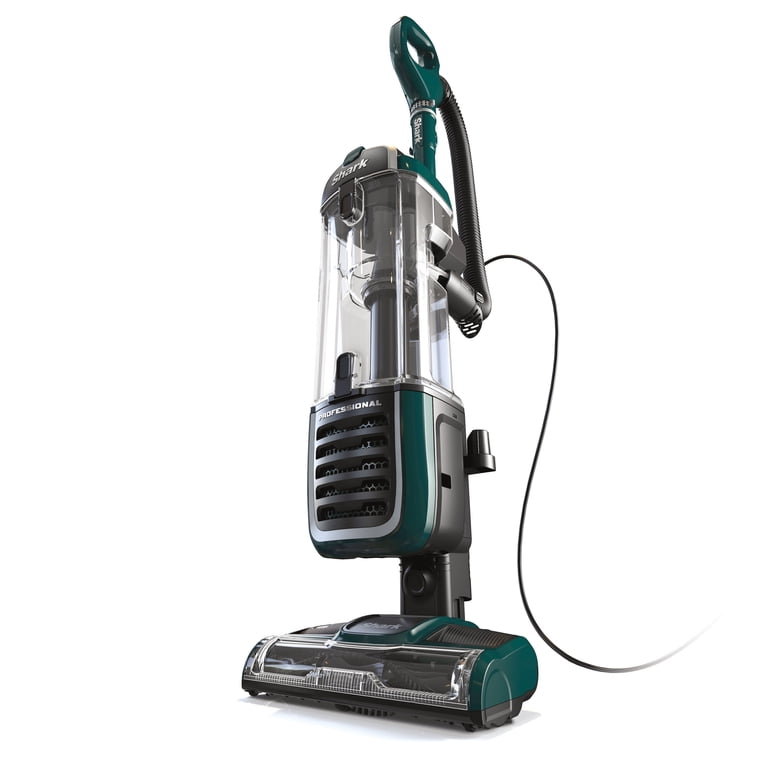
Credit: www.walmart.com
When To Replace Parts For Best Hair Pick-up
Knowing when to replace parts is key to keeping your vacuum working well, especially for hair pick-up.
| Part | Replacement Frequency | Signs It Needs Replacing |
|---|---|---|
| Brush Roll | Every 1-2 years | Bristles worn, missing, or bent |
| Belt | Every 6-12 months | Loose, broken, or brush roll not spinning |
| Foam Filter | Every 6 months (or wash monthly) | Dirty even after washing, torn, or smells bad |
| HEPA Filter | Every 12 months | Gray, clogged, or loss of suction |
| Hose | As needed | Cracks, holes, or frequent blockages |
Replacing parts on schedule prevents sudden performance drops and helps your vacuum last longer.
Advanced Tips For Pet Owners And Households With Long Hair
If you have shedding pets or long-haired family members, you face special challenges. Here are some expert tips that go beyond the basics:
- Pre-vacuum grooming: Brush pets or comb hair in one area to collect most loose hair before vacuuming. This reduces what ends up on floors and carpets.
- Use a rubber broom on carpets before vacuuming. Rubber bristles pull up hair for the vacuum to pick up more easily.
- Vacuum in two directions: Go over the carpet in one direction, then turn 90 degrees and go over it again. This helps lift hair stuck in the carpet.
- Clean the brush roll more often: With heavy shedding, clean the brush roll after every 2-3 uses to prevent tangles.
- Consider an anti-tangle brush roll: Some newer Shark models or accessories can be added to reduce hair wrapping.
- Keep floors dry: Hair sticks more when floors are damp. Wait until floors are fully dry to vacuum for best results.
Solutions For Persistent Hair Pick-up Problems
If you’ve followed all standard advice and still struggle, here are some less obvious solutions that many beginners miss:
Check For Micro-cracks In The Hose
Even a tiny crack or hole in the vacuum hose can kill suction power. Run your hands along the hose while the vacuum is running (be careful!). If you feel air escaping, it’s time to replace the hose.
Upgrade To A Newer Brush Roll
Some older Shark Navigator models have brush rolls that aren’t optimized for hair. You can buy upgraded brush rolls designed to reduce tangling and improve hair pick-up.
Try A Dedicated Pet Tool
Many Shark vacuums come with a small, motorized pet tool. This is especially effective for stairs, upholstery, and car seats. It grabs hair better than the main cleaner head in some cases.
Static Electricity Can Make Hair Stick
During dry weather, static can cause hair to cling to hard floors. Lightly mist floors with water (not too much!) And wait for them to dry before vacuuming to reduce static.
Deep Clean Carpets Periodically
Even the best vacuum can’t pull up all hair if it’s deeply embedded in carpet fibers. Deep clean carpets with a carpet cleaner every few months to pull out old hair.
Signs Your Shark Navigator Professional May Need Professional Repair
Sometimes, the issue is beyond home fixes. Here’s when to consider professional help:
- The brush roll doesn’t spin even after replacing the belt and removing clogs.
- You hear grinding, burning, or electrical smells.
- The motor shuts off repeatedly even when the vacuum is clean.
- Parts are cracked, melted, or badly damaged.
In these cases, contact Shark customer support or a trusted vacuum repair shop. Attempting repairs on the motor or electrical parts by yourself can be dangerous.
How To Prevent Hair Pick-up Issues In The Future
Prevention saves time, money, and frustration. Here are proven ways to keep your Shark Navigator Professional running smoothly:
- Clean the brush roll, dust cup, and filters regularly.
- Use the right height setting for each floor.
- Replace worn parts before performance drops.
- Avoid vacuuming up wet hair or large piles at once.
- Groom pets and brush hair away from carpets.
- Store the vacuum in a dry area to prevent mold or odors.
A little regular care goes a long way in avoiding hair pick-up problems.
Real-world Example: A Pet Owner’s Experience
Sara, a dog owner with two golden retrievers, noticed her Shark Navigator Professional stopped picking up hair after just six months. She cleaned the dust cup but didn’t check the brush roll or filters.
After reading about maintenance, she found a thick mat of dog hair wrapped around the brush roll and a clogged foam filter. Cleaning both restored her vacuum’s power. She now cleans her vacuum weekly and hasn’t had the issue return.
This real example shows how simple maintenance can solve what feels like a big problem.
What The Experts Say
Vacuum experts agree that the number one reason for poor hair pick-up is lack of regular cleaning. According to a recent survey by Consumer Reports, over 60% of vacuum problems are caused by blockages or dirty filters, not by broken parts.
Another key insight: many vacuums are designed for general dirt, not hair. The Shark Navigator Professional does a good job, but it needs more frequent brush roll and filter cleaning if you have pets or long hair.
Troubleshooting Checklist For Shark Navigator Professional Hair Pick-up
Use this checklist every few weeks to keep your vacuum working at its best:
- Is the brush roll clean and free of hair?
- Are the filters clean and dry?
- Is the dust cup empty?
- Is the hose clear of blockages?
- Is the belt tight and in place?
- Are all parts assembled tightly?
- Is the height setting correct for your floor?
- Are you using the right technique for your carpet and hair type?
Addressing these points catches problems early and prevents bigger issues later.
Frequently Asked Questions
Why Does My Shark Navigator Professional Leave Hair Behind Even After Cleaning The Brush Roll?
There are several reasons. Even after cleaning the brush roll, there could be hidden blockages in the hose or air pathways, dirty filters, or a full dust cup. Also, if the brush roll bristles are worn out, they won’t grab hair properly.
Make sure to check all these areas, not just the brush roll.
How Often Should I Clean The Brush Roll And Filters For Best Hair Pick-up?
For homes with pets or long hair, clean the brush roll every 1-2 weeks and wash the foam filter once a month. Replace the HEPA filter every 6-12 months. Frequent cleaning prevents tangles and blockages that reduce hair pick-up.
Can I Use A Shark Navigator Professional On Both Carpets And Hard Floors For Hair?
Yes, it works well on both surfaces. Make sure to adjust the height setting correctly. On hard floors, you may need to vacuum more slowly or make extra passes to pick up all hair. If static makes hair stick, lightly mist floors before vacuuming.
What Should I Do If My Vacuum Suddenly Loses Suction While Picking Up Hair?
First, unplug the vacuum. Check for clogs in the hose, dust cup, and brush roll area. Clean or replace filters and make sure all parts are assembled tightly. Look for cracks in the hose, and replace it if you find any.
These steps fix most sudden suction loss problems.
Are There Any Accessories That Help Pick Up Hair Better With The Shark Navigator Professional?
Yes, Shark offers motorized pet tools and anti-tangle brush roll upgrades for some models. These accessories are designed to grab hair from stairs, upholstery, and car interiors more effectively. Check your model’s compatibility before buying accessories. For more tips, visit the Shark official website.
Keeping your Shark Navigator Professional in good shape doesn’t have to be hard. With the right maintenance, a few expert tricks, and a little attention to detail, your vacuum can easily tackle hair—whether it’s from pets, people, or both. Regular care means less stress, cleaner floors, and a vacuum that lasts for years.