Many people love the convenience of cordless vacuums—no messy cords, easy to move around, and perfect for quick cleaning jobs. But after some time, users notice a drop in suction or find that the vacuum doesn’t run as long as it used to. The main reason? The battery is getting old. This leads to a common question: Can cordless vacuum batteries be replaced?* If you’re facing this issue, understanding your options will help you save money and make your vacuum last longer.
How Cordless Vacuum Batteries Work
Cordless vacuums run on rechargeable batteries. Most modern models use lithium-ion or sometimes nickel-metal hydride batteries. These batteries store energy, allowing your vacuum to run for 15 to 60 minutes on a full charge, depending on the model and suction setting.
Over time, all rechargeable batteries lose their ability to hold a charge. This is called battery degradation. You may notice your vacuum runs for a shorter time, takes longer to charge, or won’t turn on at all. This is not a sign of a broken vacuum—just an aging battery.
Are Cordless Vacuum Batteries Designed To Be Replaced?
The answer depends on the brand and model of your vacuum. Some cordless vacuums have removable batteries that are easy to swap, while others have batteries built inside the main unit.
Here’s a comparison of popular brands and their battery replacement options:
| Brand | Battery Type | User Replaceable? | Special Tools Needed? |
|---|---|---|---|
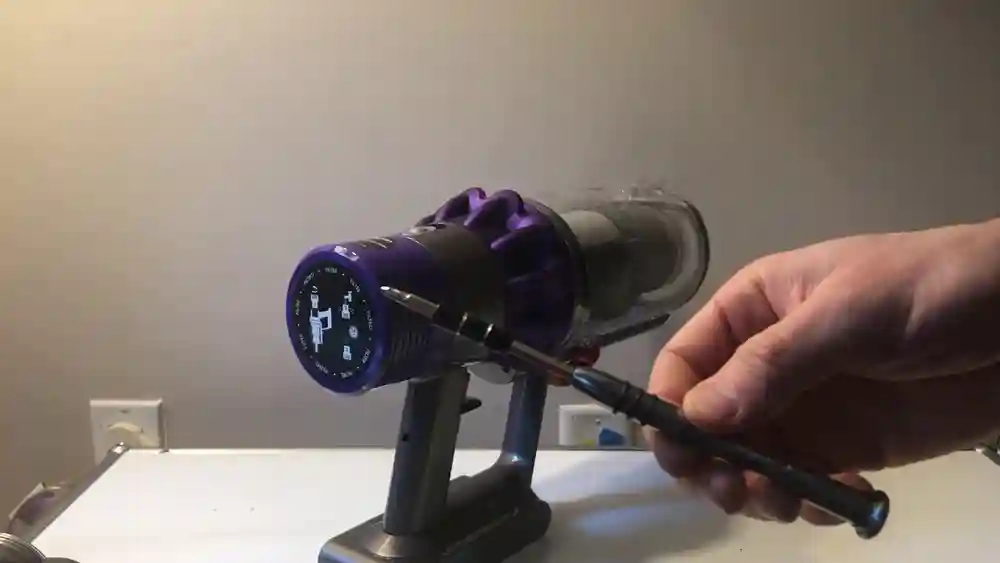
| Dyson V Series | Lithium-ion | Some models (V10+) Yes | Screwdriver |
| Shark | Lithium-ion | Yes (most models) | None |
| Bissell | Lithium-ion/NiMH | No (most models) | Advanced tools |
| Tineco | Lithium-ion | Yes | None |
| Hoover | Lithium-ion | Yes | None |
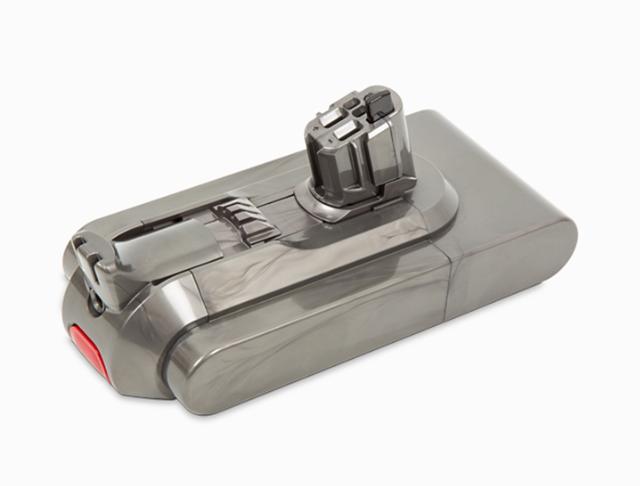
Removable batteries are common in newer models, making replacement easy. Older or budget models may have built-in batteries, which are harder to change.
Credit: www.dyson.com
Why Battery Replacement Matters
A dying battery doesn’t always mean you need a new vacuum. In fact, replacing the battery can:
- Extend the vacuum’s life by years
- Save money compared to buying a new device
- Reduce electronic waste
Most users don’t realize how much they can save. For example, a replacement battery for a Dyson V10 costs around $80, while a new vacuum might cost $400 or more. That’s a big difference.
Signs Your Cordless Vacuum Needs A New Battery
Not all power problems mean the battery is to blame. Here are clear signs the battery may need replacement:
- Reduced run time: Your vacuum dies faster than before, even after a full charge.
- Won’t hold a charge: The battery drains while sitting unused.
- Charging issues: The battery doesn’t charge fully, or the charger gets hot.
- No power at all: The vacuum won’t turn on, and you’ve checked all other parts.
- Warning lights: Some vacuums show error lights or beeps when the battery is failing.
If you see these signs and your vacuum is over two years old, the battery is probably the cause.
Can You Replace The Battery Yourself?
In many cases, yes—but it depends on your model and your comfort with small repairs.
Models With Removable Batteries
Many new cordless vacuums have a battery you can take out and replace with no tools. You simply press a button, slide the old battery out, and insert the new one. This is common with brands like Shark, Hoover, and some Dyson models (V10, V11, V15).
Models With Built-in Batteries
Older cordless vacuums or budget models often have the battery hidden inside. Replacing these batteries is harder. You may need to unscrew the housing, disconnect wires, and sometimes solder connections. If you’re not comfortable with electronics, it’s better to get help from a repair shop.
What You Need For Replacement
- The correct replacement battery (match model and voltage)
- A screwdriver (if your vacuum needs disassembly)
- Safety gloves (if you’re opening the unit)
- Sometimes a YouTube video for guidance
Tip: Always unplug and power off your vacuum before opening it.
How To Find The Right Replacement Battery
Not all batteries are the same. Using the wrong battery can damage your vacuum or even cause safety issues. Here’s how to make sure you get the right one:
- Check the model number: Look at your vacuum’s label for the exact model.
- Read the battery specs: Note the voltage (e.g., 21.6V) and capacity (e.g., 2600mAh).
- Choose a trusted brand: Original manufacturer batteries are safest but cost more. Some third-party brands are good—look for high ratings and reviews.
- Avoid ultra-cheap batteries: These may not last long or could be unsafe.
- Buy from an authorized seller: This helps with warranty and support.
Here’s a quick comparison of original vs. third-party batteries:
| Feature | Original Battery | Third-Party Battery |
|---|---|---|
| Price | Higher | Lower |
| Warranty | Yes (usually 1 year) | Maybe/Shorter |
| Safety | High | Varies |
| Performance | Reliable | Varies |
| Compatibility | Guaranteed | Check reviews |
For most people, an original battery is best for peace of mind. But high-quality third-party batteries can be a good deal if you research well.
Step-by-step Guide: Replacing Your Cordless Vacuum Battery
Every vacuum is different, but here’s a simple step-by-step process for most models with removable batteries:
- Turn off and unplug the vacuum.
- Remove the battery—for most, press a release button or unscrew a small panel.
- Insert the new battery—make sure it clicks or fits in tightly.
- Charge fully before first use—this helps battery life.
- Test the vacuum to make sure it runs as expected.
If your vacuum has a built-in battery, you may need to remove screws, open the case, and disconnect wires. In this case, look up a video for your exact model or visit a repair shop.
Important insight: Some users forget to reset the vacuum after battery replacement—check your manual for any needed reset steps.
Common Mistakes When Replacing Batteries
Many people make simple mistakes that lead to frustration or even damage. Here are the most common:
- Buying the wrong battery for their vacuum model or voltage.
- Forcing the battery if it doesn’t fit—never force or modify connectors.
- Skipping safety steps like unplugging before repair.
- Ignoring the warranty—opening the unit can void your warranty.
- Not charging fully after installation, which can shorten battery life.
If you’re unsure, ask a professional or contact customer support.

Credit: www.youtube.com
When To Replace The Whole Vacuum Instead
Sometimes, replacing the battery might not be worth it. Here are cases when buying a new vacuum is better:
- The vacuum is over five years old and has other problems (e.g., weak suction, broken parts).
- Replacement batteries are expensive or hard to find.
- The vacuum model is discontinued and there’s no support.
- The battery is swollen or leaking—this is a safety risk.
If your vacuum is in good shape and you can get a battery at a reasonable price, replacement is usually the smart move.
Maximizing Your Cordless Vacuum Battery’s Life
Battery care can make a big difference. Here are practical ways to keep your new battery healthy:
- Store at room temperature: Extreme heat or cold shortens battery life.
- Don’t leave on the charger all the time—unplug when charged.
- Charge before it’s fully empty: Don’t always run the battery to zero.
- Clean the vacuum regularly: Blockages make the battery work harder.
- Use the correct charger: Avoid off-brand chargers unless approved.
Many users don’t realize that proper battery habits can add months—or even years—to their vacuum’s life.

Credit: www.tycorun.com
Real-life Examples
- Sarah’s Dyson V8: After two years, her Dyson started dying after just five minutes. A new battery from Dyson cost $90. She swapped it herself in 10 minutes and her vacuum now runs like new.
- Mike’s Shark: Mike’s Shark cordless had a slide-out battery. He ordered a third-party battery for $35. It worked well, but lasted only one year—he now buys only original batteries.
- Anna’s Old Bissell: Anna’s vacuum had a built-in battery. The repair shop quoted $120 for the part and labor. She bought a new vacuum instead because her old one also had a broken brush.
These stories show that battery replacement is often easy and cost-effective, but not always the best choice.
Environmental Impact: Repair Vs. Replace
Many people throw away their vacuums when the battery fails. This adds to electronic waste. Replacing the battery instead helps the environment. In fact, battery replacement is a smart way to keep useful electronics out of landfills.
If you can’t replace the battery yourself, check if your city has an electronics recycling program or ask the manufacturer for take-back options.
For more details on battery recycling and safe disposal, see the EPA’s page on used household batteries.
Frequently Asked Questions
Can I Use A Higher-capacity Battery In My Cordless Vacuum?
It depends on your vacuum model. Some can handle a higher mAh rating (capacity), which means longer run time. But always match the voltage. Using a battery with the wrong voltage can damage your vacuum.
Are Third-party Batteries Safe To Use?
Many third-party batteries are safe, but quality varies. Look for trusted brands, high user ratings, and safety certifications. Avoid very cheap batteries or those with poor reviews.
How Long Does A Cordless Vacuum Battery Last?
Most last 2–4 years with regular use. High-quality lithium-ion batteries last longer if you follow good charging habits. Over time, all batteries lose capacity.
Can A Repair Shop Replace My Vacuum Battery?
Yes, most electronics or appliance repair shops can replace batteries, even in models with built-in batteries. This is a good option if you’re not comfortable doing it yourself.
What Should I Do With My Old Vacuum Battery?
Never throw old batteries in the trash. Take them to a battery recycling center or an electronics store that accepts used batteries. This prevents pollution and helps recover valuable materials.
A dying battery shouldn’t mean the end of your cordless vacuum. In most cases, cordless vacuum batteries can be replaced, saving you money and reducing waste. Just be sure to use the right battery for your model and follow safety steps during replacement. With a little effort, your vacuum can give you years of reliable service once again.